
Aquila Block Variants
Have you ever wanted a more convenient way to work with different block variants in creative mode?
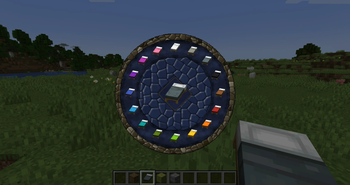
Now, by pressing the "V" key, you gain access to the Aquila palette - a special wheel that allows you to drag and drop different block variants directly to your quick access bar.
Important: options are displayed in survival mode as well, but the drag and drop function only works in creative mode.

If you don't like the palette's appearance, you can change it using a resourcepack by replacing the file: resources/assets/aquila_variants/textures/gui/aquila_palette_wheel.png
Mod Support
For mod developers wishing to integrate the palette functionality into their projects, methods from the "VariantsBlockFamilyMain" class are available:
- "registerFamily": Registering a block in a family Example: VariantsBlockFamilyMain.registerFamily("yourfamily", List.of(Blocks.YourBlock, Blocks.YourSecondBlock));
- "registerItemFamily": Similar function for items
- "registerFamilyModId": Support for string format identifiers (works for both blocks and items) Example: VariantsBlockFamilyMain.registerFamilyModId("yourfamily", List.of("minecraft:stone", "minecraft:andesite"..));
Planned Updates
Future versions will include new block variants such as:
- Vertical Slabs
- Vertical Quarters
Development is inspired by Conquest Reforged but uses original Minecraft textures. All new block variants will be compatible with resourcepacks.


