Better World Loading
Make your Minecraft world loading process more informative and modern with an elegant progress bar, detailed chunk generation statistics, and optional sound feedback!
🎯 Key Features
Modern Progress Display
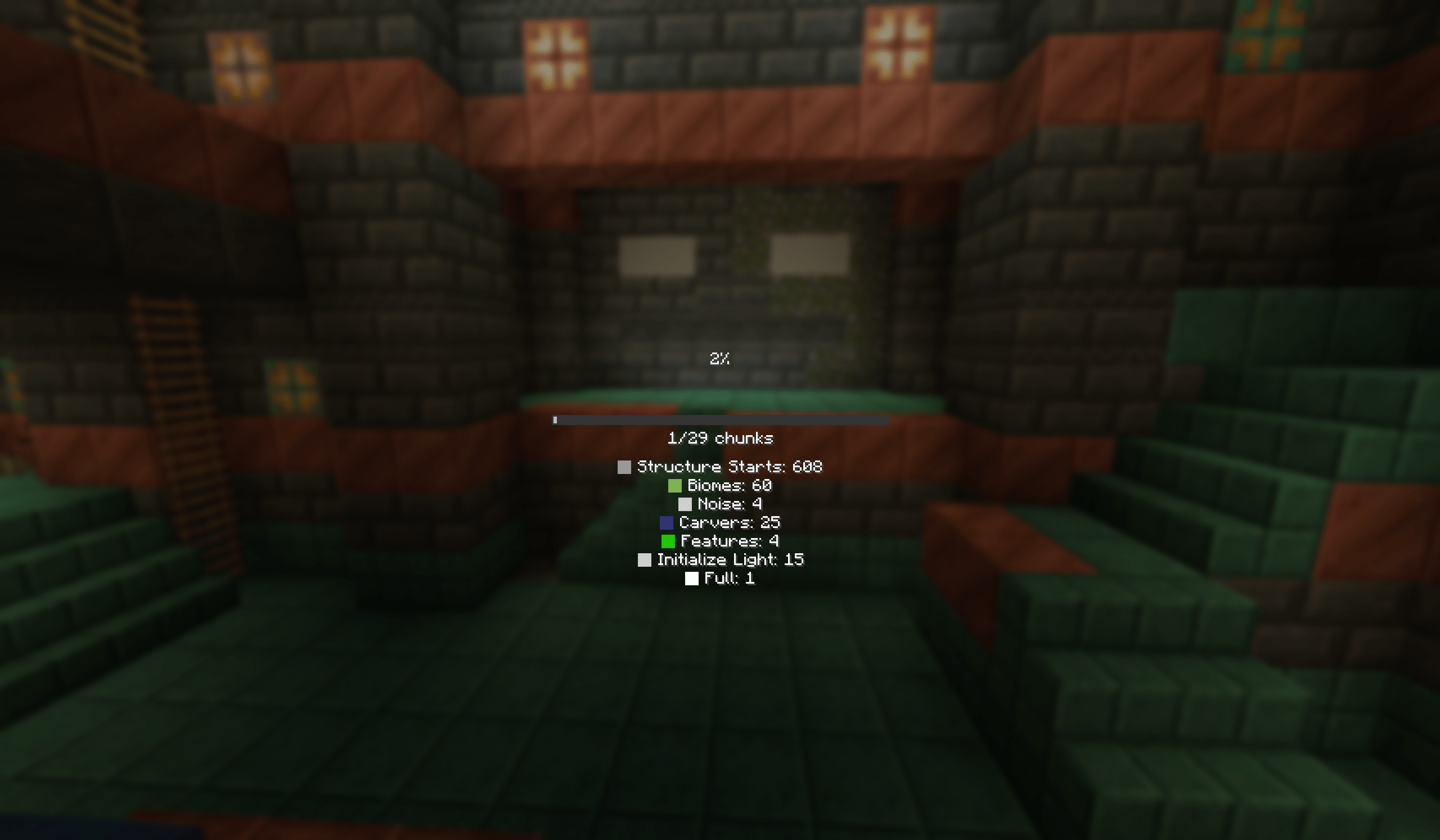
Admit it, the standard visual loading display with the basic chunk map has become outdated! We've replaced it with an intuitive progress bar that shows the exact number of processed chunks (e.g., "125/256 chunks"). Everything can be configured through a user-friendly settings interface.
Detailed Chunk Information
Enable optional detailed statistics to see the distribution of chunks across processing stages:
- Number of chunks at each generation phase
- Probability of loading various structures and placeholders
- Real-time lighting tracking and even built-in wrappers
- Visual color coding for easy identification of all zone types: empty, structure starting points, suitable landscapes, activated features, light sources, and completed chunks
Progress Sound Notifications
Add sound notifications about world generation progress - soft notes create a pleasant background and help you track the operation's progress without distracting from screen observation.
⚙️ Function Management
Any feature can be easily disabled or customized to your preference directly during the gaming session or before world creation and starting the single-player game!
💡 Why Choose This Enhancement?
- Interactive information about the actual world loading status!
- Modern and clear interface without unnecessary graphical elements
- Optimal system resource consumption and performance
- Complete control over information with customization possibilities for all parameters
Perfect solution for speedrunning records on established maps, technically active gamers, or for everyone who values quality feedback from executed processes!
🔧 Technical Requirements
- Installed Fabric loader
- Mandatory availability of standard Fabric API extension for proper operation
If you need to provide constructive suggestions and help with specific recommendations regarding the mod's menu or other interface intricacies, you can formulate your question clearly for prompt assistance.
Create your unique gaming experience - immediately after preliminary implementation, you can enhance your map generation color palette, focus on screen navigation, and position your character using the active slot functionality across various inventory and crafting systems while personalizing textures within current coordinate limitations and geographical parameters.