
Better Zoom: Smooth zooming for comfortable gameplay
Better Zoom v2.3 — an intuitive modification that enables smooth zooming using the mouse wheel and hotkeys. You have the freedom to customize essential parameters for full control over zoom, including mouse sensitivity during magnification. All this functionality is implemented without using mixin, ensuring faster game loading.
The primary goal of this modification is to provide simple and smooth zooming with mouse wheel and hotkeys, featuring only the most essential settings without complex or redundant parameters. At the same time, it offers enough customization possibilities. The mod works independently without additional libraries.

How to Use
By default, press the "C" key to activate zoom (this combination can be modified)
Use "+"/"-" keys or scroll the mouse wheel to zoom in/out (customizable)

The configuration screen appearance has changed since the version shown in the video — see screenshots below for the current state
Settings and Configuration

Standard Settings Interface (Forge 1.20.1 reference):
(opened by default with the 'V' key or through mods/configuration menu...)
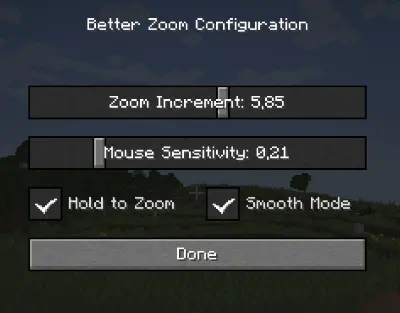

Available Settings (detailed tooltips explain each option):
-
"Zoom Increment" — how much the zoom changes with each wheel scroll (useful for rapid zooming in/out)
-
"Mouse Sensitivity" — multiplier for mouse sensitivity during zoom (helps prevent camera from moving too quickly during strong zoom)
-
"Hold to Zoom" — requires holding the zoom key to maintain magnification
-
"Smooth Mode" — smooth fade in/out effect during zooming
Custom Keybinds:

Localization

The modification supports English and French languages. You can suggest translation improvements or add new translations on the corresponding page.
Technical Features
Better Zoom is developed as a simple and compatible solution with all necessary features for comfortable zooming. If you're looking for an efficient and optimized magnification tool — definitely give it a try! The modification is actively maintained and regularly updated.


