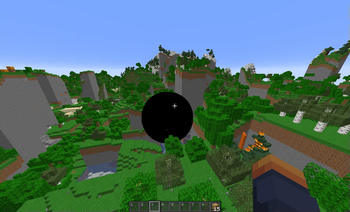

Blackhole
The Blackhole modification brings destructive and dynamic black holes into the Minecraft world, completely transforming your gaming experience.
Modification Overview
This mod adds a special block that creates a realistic black hole with gravitational effects. These cosmic objects attract everything around them - from items and blocks to living creatures. Over time, they can increase in size, pursue players, and leave a path of destruction behind them.
Key Features
- Realistic physics - gravitational effects on objects with configurable mass parameters
- Black hole evolution - gradual increase in size and influence radius
- Player pursuit - automatic following of characters within a specified range
- Visual effects - captivating particles for complete immersion in the atmosphere
- Flexible configuration - full control over black hole behavior through commands and configuration files
Command System
All commands require operator level 2 or higher and begin with /blackhole:
Parameter Configuration Commands
| Command | Purpose |
|---|---|
getmaxscale / setmaxscale <value> |
Get/set maximum black hole size |
getgravity / setgravity <value> |
Get/set gravitational constant |
getplayermass / setplayermass <value> |
Get/set mass for players |
getblockmass / setblockmass <value> |
Get/set mass for blocks |
getitementitymass / setitementitymass <value> |
Get/set mass for items |
getanimalmass / setanimalmass <value> |
Get/set mass for animals |
getchunkloadradius / setchunkloadradius <value> |
Get/set chunk loading radius |
getmaxblockspertick / setmaxblockspertick <value> |
Get/set maximum blocks processed per tick |
getmovementspeed / setmovementspeed <value> |
Get/set movement speed |
getdefaultfollowrange / setdefaultfollowrange <value> |
Get/set standard player detection range |
getplayerdetectioninterval / setplayerdetectioninterval <value> |
Get/set player detection check interval |
getgrowthrate / setgrowthrate <value> |
Get/set growth rate |
Black Hole Management Commands
| Command | Purpose |
|---|---|
togglefollow |
Toggle pursuit mode for the nearest black hole |
togglegrowth |
Toggle growth mode for the nearest black hole |
setfollowrange <range> |
Set pursuit range for the nearest black hole |
Configuration
The mod creates a configuration file config/black_hole.json with the following default values:
{
  "maxScale": 40.0,
  "gravity": 60.0,
  "playerMass": 700.0,
  "blockMass": 10.0,
  "itemEntityMass": 0.1,
  "animalMass": 50.0,
  "chunkLoadRadius": 2,
  "maxBlocksPerTick": 500,
  "movementSpeed": 1.0,
  "defaultFollowRange": 256.0,
  "playerDetectionInterval": 60,
  "growthRate": 0.04
}
Configuration Parameters
| Parameter | Description | Default |
|---|---|---|
maxScale |
Maximum black hole size | 40.0 |
gravity |
Gravitational constant (pull strength) | 60.0 |
playerMass |
Player mass (affects pull strength) | 700.0 |
blockMass |
Block mass | 10.0 |
itemEntityMass |
Item entity mass | 0.1 |
animalMass |
Animal mass | 50.0 |
chunkLoadRadius |
Radius of forced chunk loading around black hole | 2 |
maxBlocksPerTick |
Maximum blocks processed per tick (performance setting) | 500 |
movementSpeed |
Movement speed when pursuing players | 1.0 |
defaultFollowRange |
Standard player detection range | 256.0 |
playerDetectionInterval |
Number of ticks between player detection checks | 60 |
growthRate |
Black hole size increase rate | 0.04 |
Behavior Features
- Black holes consume any entities that get too close to the center
- Players in creative mode are immune to black hole effects
- Black holes can destroy most blocks, except blocks with infinite hardness (like bedrock)
- Ability to configure disabling player pursuit and stopping growth
- Falling block entities are created from some destroyed blocks for visual effect
- Each black hole has its own pursuit and growth settings
Technical Information
- Polymer is used for block rendering
- Black holes are implemented as block entities with associated display entities
- Forced chunk loading ensures black holes continue to function even when players are not nearby
- A scheduled tick system is implemented to control black hole growth and movement
Known Issues
- Black hole rendering issue: The circle often appears to be moving when the player changes their viewing angle, which is related to the billboard display mode for item display. Complex mathematical calculations are required to fix this.
- Render distance issue: The black hole disappears when moving too far away, even within standard render distances, due to entity rendering limitations.
Compatibility
The mod is created for Fabric and requires:
- Fabric API
- Polymer