
CommandsSpy
CommandsSpy
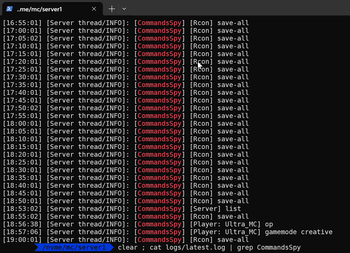
The modification provides functionality for tracking and recording executed commands in the server console. The system logs both existing and non-existent commands, including those that are permitted or restricted for users, saving information directly in Minecraft server logs.
Installation Process
To activate the mod, simply place the files in the mods folder on your server. After server startup, the modification will automatically begin monitoring all executed commands. The configuration file is automatically generated upon first launch.
Usage Examples
With the "logArguments" setting set to false (default parameter), a command like "/gamemode creative" from player "Ultra_MC" is recorded without additional parameters:
[18:57:06] [Server thread/INFO]: [CommandsSpy] [Player: Ultra_MC] gamemodeWith the "logArguments" option enabled, the same command is recorded with full parameter details:
[18:57:06] [Server thread/INFO]: [CommandsSpy] [Player: Ultra_MC] gamemode creativeThe /op command from player "Ultra_MC":
[18:56:38] [Server thread/INFO]: [CommandsSpy] [Player: Ultra_MC] opThe /list command from server console:
[18:53:02] [Server thread/INFO]: [CommandsSpy] [Server] listA RCON command like /save-all:
[09:25:01] [Server thread/INFO]: [CommandsSpy] [Rcon] save-allConfiguration Settings
Main Configuration File: config/commands-spy.json
Default Settings
{
"blacklist": [],
"logArguments": false
}
Command Blacklist
To exclude specific commands from logging, add them to the blacklist. For example, to maintain conversation privacy, you can exclude commands like tell and t.
"blacklist": ["tell", "t"]Command Arguments Logging
By default, command parameters are not recorded in logs ("logArguments": false). Example: a command like /a b c would be recorded as [CommandsSpy] [Player: Ultra_MC] a.
To log all command parameters, use the "logArguments": true setting. Example: the command /a b c would be recorded as [CommandsSpy] [Player: Ultra_MC] a b c.


