CrosshairTarget
This mod completely transforms the visual display of the crosshair in Minecraft, adapting it to the current game situation. Depending on what you are doing in the game, the crosshair will change its shape and show various useful information.
Types of Crosshairs and Their Features
The mod offers five different crosshair variations, each activated under specific conditions:
- Default mode — standard crosshair from the base game displayed in idle state
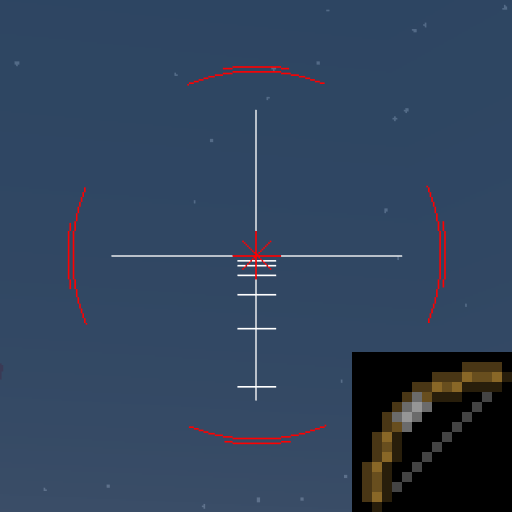
- Bow pulling — shows bow pull progress and adds aiming elements
- Item usage — displays interaction progress bar with objects
- Targeting entities — shows distance to target and attack progress
- Block breaking — indicates how much the target block has been destroyed
Functional Features
Crosshair when attacking entities
- Blue line indicates current distance to target
- White line shows maximum attack range

Bow aiming
- Red outer lines move closer to center as shooting range increases
- Small white lines indicate distance
- Short red lines show bow pull progress

Item usage
- Green fill displays item usage progress

Block breaking
- White fill shows how much the target block has been destroyed

Technical Requirements
The mod requires the ImproperUI library to be installed. Access to settings is through the "+" key on the keyboard.


