Epic Fight - Particles On The Blades
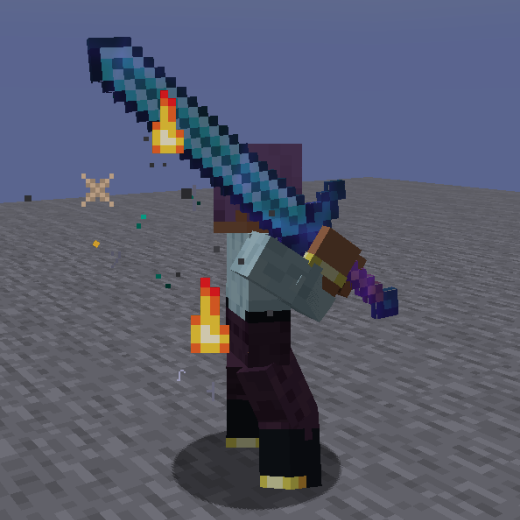
This small mod adds visual particle effects to enchanted weapons or items with special abilities. Particles can appear continuously or activate when using built-in skills, with all effects and enchantments being fully customizable!
Configuration Setup
The mod's configuration is divided into three main parts: for supported entities, for items, and for the particles themselves.
Entity Configuration
To add entities, you need to create a datapack extending the file: data/blade_config_tag/tags/entity_types/valid_entity.json
This file adds entities that will display particles when using enchanted weapons. It's important to note that ALL entities MUST be patched for Epic Fight, otherwise attempting to generate particles may cause an exception (game crash).
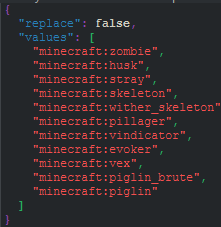
This is the list of non-player entities that will display particles when using appropriate weapons.
Item and Particle Configuration
Particle Parameters
Several parameters are used to configure particles on items. Let's consider an example with a greatsword:
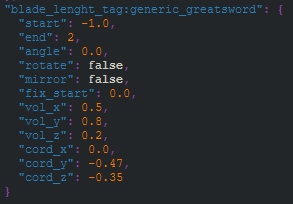
Main parameters:
- Start and End - define the beginning and end of the particle beam in space and time, controlling the number of generated particles
- Angle - legacy parameter for shifting Y or X coordinates
- Rotate - rotates the particle beam from Y axis to X axis
- Mirror - creates a duplicate of the original beam (A1 and A2)
- Fix Start - moves the starting point of beam A1 when Mirror is enabled
- Vol X, Y and Z - configure the beam volume, distributing particles in the designated area
- Cord X, Y and Z - adjust the coordinates of the particle generation area
Item Configuration
Item configuration is done in two ways: through tags (groups) or through individual items (weapons). Groups are convenient for typical weapons, while individual items are for special or two-handed weapons.
Both configuration types are located in the folder: assets\epic_fightutilities\weapons\
Files are distinguished by prefixes:
tag- for tag (group) configurationweapon_- for individual item configurationcapabilitytag- for tag compatibilitycapabilityweapon- for item compatibility
Tag (Group) Configuration
Create a file in the folder assets\epic_fight_utilities\weapons\ with the name tag_author_target_or_group
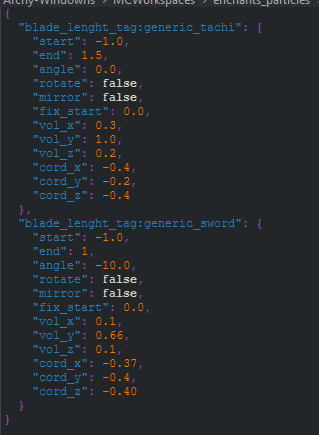
The ItemTag domain MUST ALWAYS be blade_length_tag. To use this configuration, create the corresponding ItemTag in the folder data\blade_length_tag\tags\items
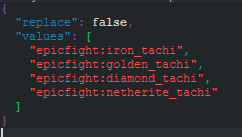
Item (Weapon) Configuration
This method is simpler - just create a file with the prefix weapon_ in the same folder.
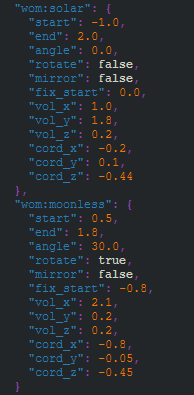
Simply specify namespace:itemid and particle parameters without additional steps.
Additional Settings
In the folder data\blade_config_tag\tags\items you can configure:
- Ban fire particle generation - add item to
get_banned_innatefire.json - Force fire particle generation - add to
get_bypassfire.json - Use alternative particles - add to
getsoulfire*.json
Particle Configuration
Particle configuration is located in the folder .minecraft/config/epic_fight_potb and includes 4 files.
fire_aspect_particles_mapping.json
Configures particles for Fire Aspect enchantment and similar ones. If an item has no configured built-in particles, fire particles intensely envelop the weapon.
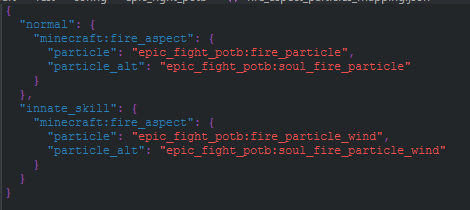
innate_skill_particle_mapping.json
Allows assigning specific particles to items that activate when using built-in abilities. Accepts three parameters: item, particle, and particle count.
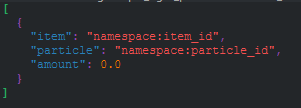
These particles replace particles from the "innate_skill" section in the previous file.
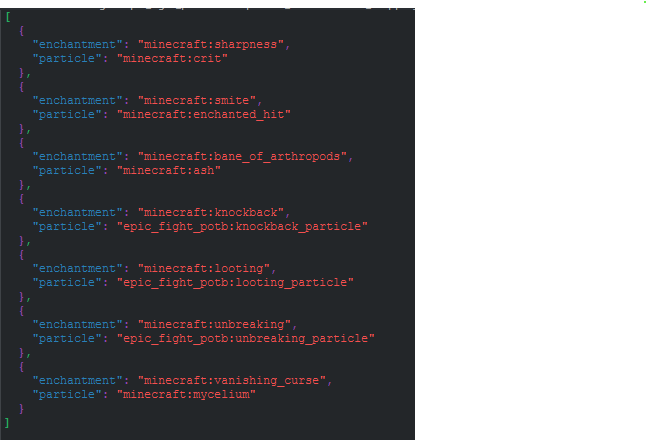
particle_enchantments_mapping.json
Allows quick configuration of which enchantments generate particles. Simply specify the enchantment (namespace:enchat_id) and the corresponding particle.