
IDoTheBlacklist
IDoTheBlacklist is a server-side Minecraft mod that significantly enhances your server's security through integration with a centralized blacklist API system. The mod automatically checks every connecting player against a database of problematic users and blocks their access if they are found in the list of banned individuals. This development is part of the IDoTheBot and IDoTheAPI tool ecosystem, designed to maintain order and security in Minecraft communities and related Discord servers.
Blacklist System Operation
The blacklist serves as a crucial tool for creating a comfortable and secure gaming environment in all communities associated with IDoTheBot. Here's how this system is organized:
- Centralized API: All banned user database data is stored and managed through a unified API endpoint. This ensures that all connected servers receive the most up-to-date information in real-time.
- IDoTheAPI Integration: The IDoTheAPI system manages blacklist updates. Authorized users can add or remove entries from the database using specific commands in the Discord server.
- Minecraft Integration: The IDoTheBlacklist mod retrieves data from this list and instantly blocks access to any player whose data is found in this database.
Transparency and Collective Management
A key feature of the IDoTheBlacklist system is the principle of complete transparency and collaborative administration:
- Open Source Code: Since the project code is open, anyone can study the workings of the ban system, enabling continuous improvement by the community.
- Authorized Users: Specific Discord users receive permissions to modify the blacklist. At the same time, the list of these users is publicly available, ensuring accountability for actions.
- Community Oversight: Any changes to the mod's functionality, especially those related to the ban system, must undergo mandatory review and approval by
@IDoTheHaxin Discord before implementation. This guarantees that all innovations comply with community standards.
Features
- Automatic Verification: Every connecting player is automatically cross-referenced against the centralized banned users database.
- Network-Wide Ban Management System: Using an external API allows creating a unified ban system effective on all connected servers.
- Operator Notifications: Server administrators receive notifications about verification results and taken actions.
- Configuration Settings: Secure storage of API key for accessing the blacklist system.
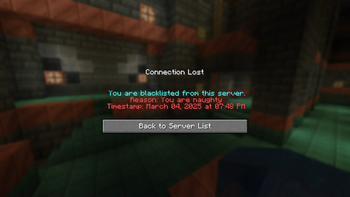
- Custom Messages: Banned players see a clear message indicating the ban reason and timestamps.
- Logging System: Records all verification operations, API responses, and errors for subsequent analysis.
Installation and Setup
Required Prerequisites
- Minecraft server on Fabric
- Installed Fabric Loader
- Obtained API key from the IDoTheHax Discord server
Installation Process
- Mod Download: Download the latest version of IDoTheBlacklist from available distribution sources (GitHub Releases or other repositories).
- File Placement: Place the downloaded
.jarfile in themodsfolder of your Minecraft server.- If the
modsfolder doesn't exist, create it in the directory containing theminecraft_server.jarfile.
- If the
- Server Launch: Start your Minecraft server. Fabric Loader will automatically load installed mods, including IDoTheBlacklist.
Usage
API Key Setup
The mod requires an API key to work with the blacklist system. Setup is performed as follows:
- Login as Operator: Join the Minecraft server with operator privileges (access level 4 to execute
/setapikeycommands). - Command Input: Use the
/setapikeycommand with your API key:/setapikey <your_api_key>- Replace
<your_api_key>with the key obtained from the IDoTheHax Discord server.
- Replace
- Confirmation: The system will display a message confirming successful API key setup.
- The key is stored in the
config/idotheblacklist.jsonfile on the server.
- The key is stored in the
Blacklist Checks
- After API key configuration, the mod begins automatically verifying all connecting players through the banned database.
- Players found in the blacklist receive a message about the block with the ban reason and timestamps and are disconnected from the server.
- Server operators are notified about performed checks and blocking results.
Configuration Settings
IDoTheBlacklist's configuration file is located at config/idotheblacklist.json.
idotheblacklist.json Parameters
api_key: Your API key obtained from the IDoTheHax Discord server. Configured via the/setapikeycommand or by manually editing the file. Keep this key strictly confidential!
Troubleshooting
API Key Not Set
- Without a configured API key, the mod skips verifications and allows players to connect.
- Operators receive a warning about the need to set up the API key.
- Solution: Set up the API key using the
/setapikeycommand according to the Usage section instructions.
API Connection Errors
- When connection issues to the external API occur, the mod stops verification and permits player connections.
- Operators are notified about blacklist check failure.
- Solution: Check server logs for detailed error information. Ensure the server has internet access and can connect to the API endpoint.
Invalid API Key
- If the API system rejects the request due to an incorrect key, verifications aren't conducted, and players can connect freely.
- Operators receive a message about API key invalidity.
- Solution: Make sure the key was created correctly through the Discord interface and entered properly using the
/setapikeycommand.
Blacklisted Player Connects
- In cases where a user from the banned database still connects to the server, check API functionality and the presence of the player's UUID in the blacklist.
- Analyze server logs to detect errors or warnings related to verification operation.
Technical Support
For assistance, consultations, or reports about encountered errors, contact the IDoTheHax Discord server.