
Inductive Automation
Originally I created this mod to play with friends on a private server because I enjoy customizing Minecraft to my preferences. Development followed the principle: "It would be great if I had... Oh wait, I can program it!" Now I'm publishing this mod so other players can enjoy it too.
Mod Content
The mod includes numerous machines and tools that assist with large building projects in survival mode, automate resource gathering, and perform other tasks:
The automatic builder can construct almost any structure automatically (complex projects may require Computercraft and/or multiple processes). The automatic miner excavates configurable rectangular areas (theoretically can work with any shape when controlled via Computercraft), so its applications aren't limited to just ore mining. The farm automates planting and harvesting of wheat, trees, and other plants (not limited to plants - theoretically can "plant" and harvest anything it's instructed to).
Also included are machines for pumping and filling fluids, crafting, efficient ore processing, accelerated smelting, and even moving entire world sections.
The mod provides an efficient item and fluid transport system, as well as its own electrical energy required to power most machines. Energy can be produced in various ways (fuel, lava, biomass, solar panels) and there's a bidirectional converter for Redstone Flux (the most common energy in other mods). Energy can also be converted into antimatter, which is used for storing huge amounts of energy, creating powerful explosions, and required in some crafting recipes.
Additionally available are convenient tools (portable crafting table, furnace, item storage, teleporter, electrical tools), powerful end-game items, new materials, fluids and crafting recipes, plus many other features including portals and an electrical anti-griefing system.
Usage Examples
One of the main goals of this mod is multifunctionality. Here are some examples:

This automatic farm is configured to:
- plant potatoes wherever possible
- use bone meal on everything that can yield potatoes
- harvest everything that yields potatoes and has block metadata 7 (fully grown)

This farm is configured to:
- plant saplings wherever possible
- use bone meal on everything that can yield saplings
- harvest leaves
- use flint and steel on the side of everything that can yield logs
The automatic farm can perform almost any right-click operations on specified blocks using block placement controllers.

This farm is configured to:
- harvest everything that can yield dirt
- place sandstone on stone
- place sand on sandstone

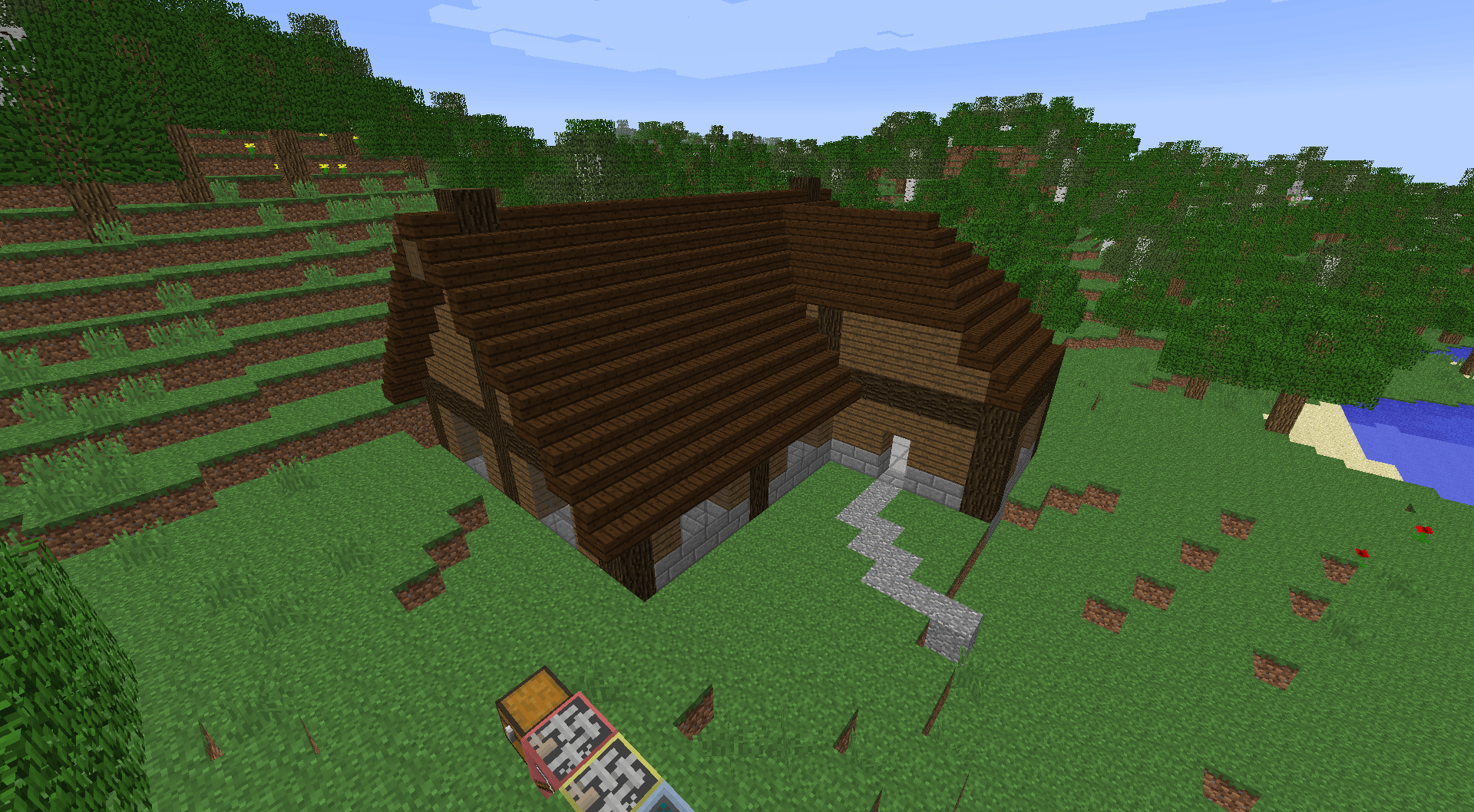
This automatic builder constructed a house from 11 building textures (one for each layer). Stairs were configured using block placement controllers for proper orientation, and the attached automatic miner was used to excavate the hill where necessary.

With this mod, you no longer need to build such structures manually (though you still need to provide building blocks and energy).

This house probably looks familiar. This is what "moving entire world parts" means. This house (and part of the surrounding landscape) was teleported to the Nether using the teleporter, costing "only" about 11.5 million kJ (= 115M RF equivalent) of energy. The black block is an interdimensional wormhole needed to move objects between dimensions.
Compatibility with Other Mods
The mod uses Forge Modloader, so it can be installed alongside other Forge-based mods.
The mod can be played standalone without losing core content, but it's more optimized for use in modpacks and can interact with other mods in various ways:
Items such as Copper Ore, Silver Ingot, Steel, and others are registered in Forge's Oredictionary, so you can use equivalent items from other mods in recipes. Also fluids like Steam and Biomass are shared with other mods.
Some ores from the most common mods are added to Advanced Furnace ore processing in the configuration file by default. You can remove them or add your own.
The Energy Link block can convert energy from other mods (Thermal Expansion) into this mod's energy and vice versa: 1 RF <--> 100 J.
Item and fluid pipes and machines from this mod can be used for machines from other mods, just as their fluid and item transport can be used here.
The Farm should also be able to plant and harvest non-vanilla plants (if not, try using Block Placement Controllers).
Also the Teleporter should be able to move most modded blocks without issues.
Computercraft Peripherals
Some machines can be used as Computercraft peripherals, allowing more detailed control:
The Miner will only mine blocks at positions specified via commands.
The Builder can be told which block should be placed where.
Computercraft can also be used to set the target position of a Teleporter and initiate teleportation.
Detectors used for monitoring energy, fluid, or item states of a connected block allow reading the entire inventory, all contained fluid tanks, and the exact amount of energy stored in the connected block when used as a peripheral device.
Configuration File
Automation generates a file named automation.cfg in the config folder of your Minecraft directory during the first launch of this mod.
By editing this file with a text editor, you can change some game settings of Inductive Automation:
Ore Generation:
By default, Copper and Silver ore will only spawn in your world if not provided by other mods. This can be changed to never spawning these ores (for whatever reason) or always spawning them (if you want to use ores from Inductive Automation rather than from other mods).
Energy:
You can change energy capacity and consumption, as well as power generation and cable properties for most machines and tools.
Energy conversion rates for RF and EU can also be changed (if you're unhappy with the default energy balancing).
Antimatter Bomb:
When running a Minecraft server, one might fear the entire world being destroyed by players excessively using antimatter bombs.
To prevent this, you can change the maximum explosion radius (default 256) to a less destructive value (e.g., 16). This wouldn't change their ability to break bedrock and obsidian.
You can also make them more/less expensive to use by changing the explosion power multiplier.
Advanced Furnace Recipes:
You can add your own recipes for the Advanced Furnace in the configuration file if desired.
Some ore processing recipes for ores from other mods are added by default. To add a new one, simply extend all colon-separated arrays. For fluids, use the fluid registry name with the amount followed by ''. For items, use the ore dictionary name of the item with the optional stack size followed by ''. If the stack size isn't given, the recipe will only take one item. Leave whitespace for item or fluid slots that aren't used. Ensure all arrays have the same number of elements, otherwise recipes won't be loaded.


