
JustHelper
The JustHelper modification is specifically designed for developers working with code on the JustMC server. This tool significantly simplifies the programming process, helping to quickly find necessary elements in extensive projects and efficiently navigate the codebase.
Compatibility: Minecraft version 1.20.2 and newer
Main Commands
Sign Search:
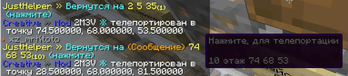
/signs TEXT- displays all signs containing the specified text, with coordinates, floor level, and full content. Clicking on the result in chat instantly teleports to the required sign/signs- shows all loaded signs in the world
Text Work:
/texts- extracts text from clipboard (up to 16,000 characters)/texts +clip- for working with large texts (splits into parts of 5,000 characters each)
Multifunctional Tools:
/multimsg- sending multiple messages via\nseparator with space support through%s/edit- advanced item editing with attribute and custom tag support
Standard Shortcuts:
/n- output numbers separated by spaces/t- quick text output/vl,/vg,/vs- work with local, game, and saved variables
Configuration Settings
Configuration file location: C:\Users\USER\AppData\Roaming.minecraft\justhelper\config.json
Main Parameters:
custom_class_for_sign_output- using custom class for sign text outputenable_back_teleport- return notifications after teleportationtexts_command-/textscommand settings with character limitscommand_buffer_cooldown- automatic command sending intervalshort-commands- shortcut command configuration for automation
Advanced Editing Capabilities
The /edit command provides complete control over items:
- Adding and removing custom tags
- Managing item attributes
- Renaming with color code and JSON support
- Working with item descriptions (lore)
- Setting quantity, color, enchantments
- Configuring models, durability, and special properties
Short Command System
Shortcut commands significantly speed up development by automating routine operations. Each command is configured through the configuration file with argument types, suggestions, and execution patterns.
Configuration Example:
"n": {
    "arguments": {
        "numbers": {
            "type": "greedy",
            "suggestions": [],
            "parser": "double",
            "split": " "
        }
    },
    "structure": ["numbers"],
    "run": "num ${1}"
}
This configuration turns the command /n 5 10.2 2020 into sequential execution of /num 5, /num 10.2, /num 2020, saving developer time.


