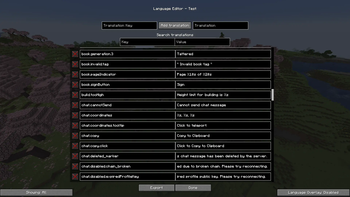

Language Translator
The Language Translator modification provides the ability to create and edit language files directly in the game through a convenient menu.
How to Use
To open the language editor, use the assigned key (default: N).
Creating Languages
In the editor menu, click the "Create new language" button. You will be prompted to specify:
- Code - language identifier in the format
en_us - Name - display name of the language, e.g., "English"
- Region - geographical affiliation, e.g., "United States"
- Description (optional) - language description
Also select the language type:
- Create a new language - adds a separate language to the available list
- Overlay an existing language (default) - modifies the current language without creating a new one
After filling all fields, click the create button.
Editing Languages
To modify an existing language, click the edit button next to the desired language.
Searching Translations Enter the required phrases in the search fields to find translation keys or values.
Adding Translations Enter the key and translation value, then click the add button. Use the X button to the left of the key for removal.
Tip: You can click on a translation in the results list to automatically fill the fields.
Category Filtering Selectors allow filtering translations by categories: All, Finished, Unfinished, Captured, Minecraft, or other mods.
"Captured" Selector
Shows translation keys used after pressing the capture key (default: K). For example, when pressed in the main menu, the key menu.options will be shown.
Overlay The overlay function modifies all loaded game translations. Enable it with the button in the bottom right corner. Advantage over resource packs - automatic reloading without needing to reload all resource packs.
Auto-reload works when directly editing files in the languages-eplt folder in the game directory.
Viewing Translation Keys
Press M to view translation keys used by the game. Available modes:
- View translated text (default)
- View keys and arguments (with original colors)
- View keys and arguments (with color palette):
- Aqua - strings marked as Text/Component
- Red - keys without specified translation
- Green - keys with translation (requires overlay)
- Pink - strings marked as String
- Gray - other symbols
Exporting Languages
To export languages, click the corresponding button in the editor, specify the resource pack name. The file will appear in the resource packs folder.
Enabling Languages First enable the resource pack, then select the language in Minecraft's standard language list.
Additional Information
The mod is compatible with modpacks.


