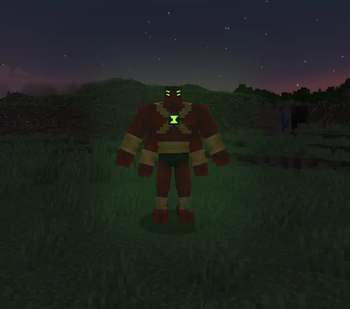

Omnitrix Evolution (Alienevo Addon) - Evolution of the Omnitrix
This addon for Alien Evolution introduces completely new versions of the Omnitrix - Recal, Ultimatrix, and OV models - which now function as separate devices with full holograms! Most importantly: they can now be obtained in survival mode, opening up a completely new level of gameplay.
Main Features
Unique alien forms have been added, such as Rath, Goop, Spidermonkey, and Brainstorm. In survival mode, Rath and Goop are available, making world exploration and battles significantly more diverse.
Important note: Using aliens without corresponding holograms will cause the game to crash. Ensure all custom forms are compatible with the hologram system or are equipped with holograms specifically developed for this addon.
How to Get the Recal Omnitrix
To obtain the Recal version, you need to master the Decouple skill and accumulate at least 2 skill points. After this, the Recalibration function will automatically unlock. You can activate it through the Omnitrix settings - performing this operation resets the device's calibration.
Ultimatrix: A New Era of Possibilities
The Ultimatrix can be found by exploring underground structures containing special cores. You will also need to create the Ultimatrix base. When both components are ready, place the core in your offhand and the base in your main hand, then use right-click to assemble the device.
The Screewdriver: Alternative Way to Obtain
The Screwdriver provides an alternative, although unlikely, way to obtain the Recal Omnitrix (only 2% chance at level 50+). It can also be used to obtain Master Control (3% chance at level 30+), additional abilities (5% chance), or get nothing at all (90% probability).
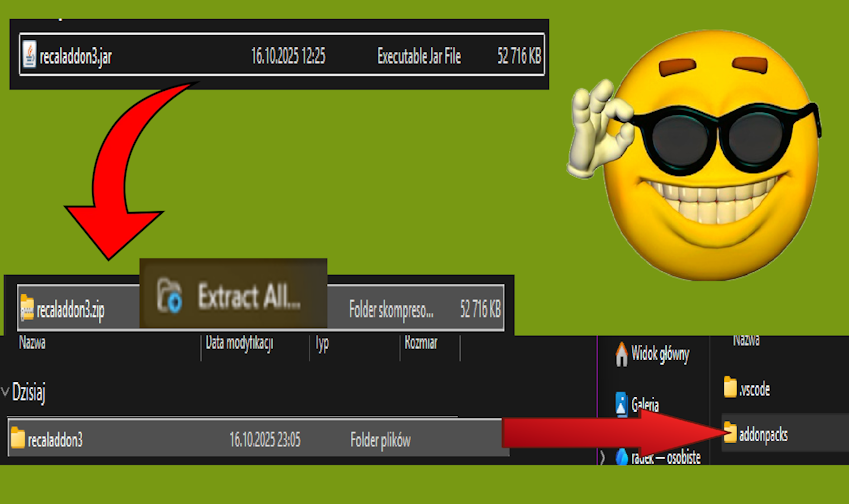
AF uniforms for AF aliens work exclusively when the JAR file is unpackaged and manually placed in the addonpacks folder.
Compatible Addons:
- Nightlitevo Addon
- The Anur Trio
- Celestialsapien
- Pugmeowla's Time Walker
- Pugmeowla's Saiyan Awakening
- Omniextras
- The Five Project
- Chromastone Alien Evolution
- Buzzshock addon
- To`kustar Addon
- Pepsi Evo
- Ninjago Aliens
- Fangs Of The Night
For Addon Developers
Creating custom holograms requires creating an appropriate model and placing it in the "evo_reds_alienpack:geo/holograms" folder with the name in the format "alien_CODEX-NUMBER-HERE". Textures are placed in "evo_reds_alienpack:textures\models\holograms" with a similar name. Be sure to create _default geometry and textures for each alien.
Adding ultimate forms requires using KubeJS scripts with specific data structure:
global.alienevo_ultimate = {
    aliencodex_number: true
}
The file with ultimate abilities is placed in "evo_reds_alienpack_ult" with the name ult_alienname, where basic abilities are replaced with alien_base_form mechanics when the timeout function is removed.