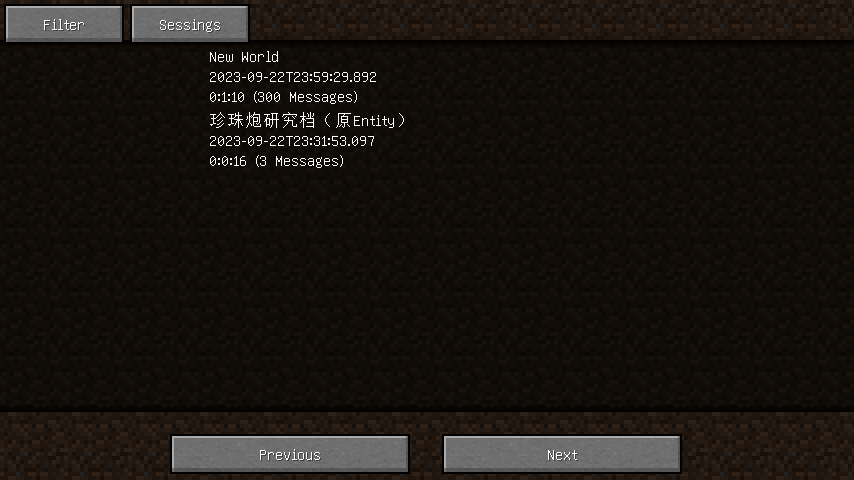

Permanent ChatLogs
The Permanent ChatLogs mod saves chat history to the hard drive so messages aren't lost after exiting the game. Unlike standard log files in the "logs" folder, the saved records support additional styles: colors, fonts, and even pop-up tooltips. Additionally, information about the time messages were received is available here, which is missing in the base version of the game.
Main Features
- Chat history recording — all messages are saved automatically
- Data export — ability to download chats in TXT or HTML formats
- Enhanced interface — extended message history in chat
- Session management — deletion, splitting and merging of records
- Search and filtering — quick search through sessions and messages
- Event markers — ability to mark important moments in chat
Session Filtering
You can easily find the sessions you need using various criteria:
- Save or server — filter by associated world or server
- Time periods — search by specific day, month, or year (e.g.: 20240306, 202403, 2024)
- Message count — filtering by number of messages in session (range format: ..20 — from 0 to 20, 20.. — from 20 and above)
- Session duration — search by recording length
- Game type — separating multiplayer sessions from single-player ones
Settings
visibleLineCount— determines the maximum number of messages displayed in chatautoSaveIntervalInMs— sets the interval for automatic chat saving in milliseconds
Pop-up Tooltips
If text in chat history contains clickable events or hover events, a pop-up tooltip is displayed with the corresponding arguments. When both click and hover events are present simultaneously, only the hover event argument is shown initially — to view the click argument, hold the Alt key.
Text on pop-up tooltips can be copied by clicking on it while holding the Ctrl key.


