
Right Click Item Picking
Collect items with a single right-click
This modification introduces new possibilities for more convenient item collection in Minecraft. Instead of the standard approach with automatic pickup or the need to hold items, you get several intuitive working modes.
Configuration
Use the command scoreboard players set <config> rcip.config <value> to adjust parameters:
Available Settings
| Parameter | Description | Values |
|---|---|---|
defMode |
Default mode for new players | Right Click Menu:0, Right Click Items:1, Vanilla:2, No Picking:3 |
playerTip |
Conditions for showing hints to players | Never:0, NewPlayers:1, JoinGame:2 |
tipLoc |
Location for displaying tips | Chat:0, Title:1, Subtitle:2, Custom(#rcip:show_tip):3 |
updTick |
Update interval in ticks | >0 |
Operational Modes
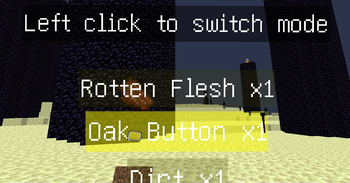
1. "Right Click Menu" Mode
- Use scroll wheel to select desired item
- Click right button to pick up chosen object
- Enable temporary collection with
/trigger Right-Click-Item-Picking--Switch-picking-mode
2. "Right Click Items" Mode
- Aim cursor at any accessible object and click right button
- Item instantly appears in inventory
3. Vanilla Mode
- Preserves familiar mechanics without pickup delay changes
4. "No Picking" Mode
- Complete disabling of collection mechanism
Switching and Management
In right-click mode, use left click to change settings when items are nearby. The command /trigger Right-Click-Item-Picking--Switch-picking-mode provides flexible mode switching.
Usage Recommendations
- World Exploration: optimally apply menu click mode
- Combat Situations: choose vanilla or instant collection for rapid evasion
- Resource Mining: item click mode works best for efficient material extraction
Uninstallation
To remove the modification, execute:
/function uninstall:right_click_item_pickingImportant Information
Please note that in multiplayer, this modification may cause slight delays when multiple users interact with items simultaneously.


