

ServerAlarmClock
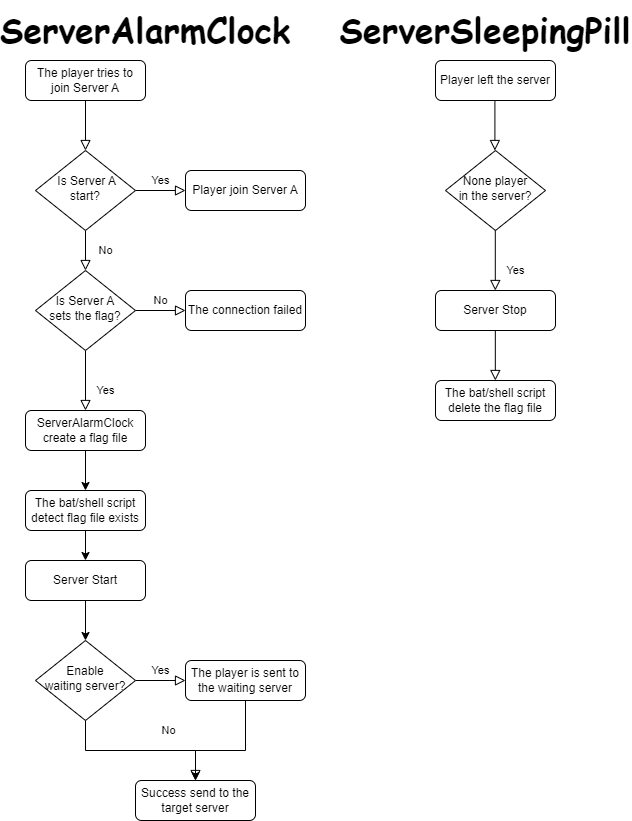
ServerAlarmClock is the perfect solution for automatically waking up your Minecraft server! Tired of encountering situations where the server is in sleep mode and players can't connect? This plugin ensures automatic server startup when a player attempts to join, guaranteeing minimal waiting time.
Key Features
- 🚀 Automatic Server Startup: The server automatically turns on when a player tries to connect to a stopped or sleeping server.
- 💬 Customizable Messages: Send personalized notifications to players while they wait for the server to start.
- 🔧 Simple Configuration: Easy setup without unnecessary complications.
How It Works
Commands
# reload plugin configuration (serveralarmclock.reload)
/sac reload
Installation Guide
-
Plugin Installation:
- Download the
ServerAlarmClock.jarfile and place it in your BungeeCord plugins folder.
- Download the
-
Flag Configuration:
- Open the
config.ymlfile in theServerAlarmClockfolder. - In the
flagssection, specify the paths to the flag files for each of your servers. These flags will be used to start the servers.
- Open the
-
Server Startup Script Setup:
- Create or modify the server startup script by adding the flag file check logic. A Linux script example is provided at the end of this description.
-
Server Startup:
- After completing the setup, reload the plugin using the
/sac reloadcommand. The plugin will now monitor connections and start the target server when a player attempts to join a stopped server.
- After completing the setup, reload the plugin using the
-
Enjoy!
Linux Script Example
#!/bin/bash

# Server directory
SERVER_DIR="your/server/path"

# Path to the flag file
FLAG_FILE="your/flag/file/path/example.flag"

# Change to the server directory
cd "$SERVER_DIR" || { echo "Failed to change directory to $SERVER_DIR"; exit 1; }
while true
do
  # Check if the flag file exists
  if [ -f "$FLAG_FILE" ]; then
    echo "Minecraft Server is Starting"

    # Start the server
    java -jar server.jar

    # Remove the flag file
    rm -f "$FLAG_FILE"

    echo "Minecraft Server has Stopped"
  else
    sleep 1
  fi
done
Windows Script Example (generated by GPT)
@echo off

REM Server directory
set SERVER_DIR=your\server\path

REM Path to the flag file
set FLAG_FILE=your\flag\file\path\example.flag

REM Change to the server directory
cd /d "%SERVER_DIR%"
if %errorlevel% neq 0 (
    echo Failed to change directory to %SERVER_DIR%
    exit /b 1
)

:loop
REM Check if the flag file exists
if exist "%FLAG_FILE%" (
    echo Minecraft Server is Starting

    REM Start the server
    java -jar server.jar

    REM Remove the flag file
    del /f "%FLAG_FILE%"

    echo Minecraft Server has Stopped
) else (
    timeout /t 1 /nobreak >nul
)

goto loop
With ServerAlarmClock, your players will always be satisfied, and your server will be ready to work at any time!


