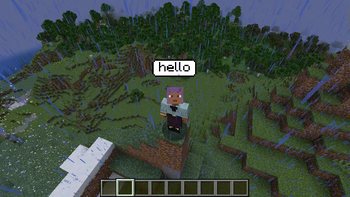

📢 Speech Bubbles – Visual Communication for Minecraft
Speech Bubbles is a Minecraft modification that replaces voice communication with on-screen text bubbles, introducing a new way to interact in the game, especially in multiplayer environments with proximity-based features.
Unlike traditional voice chat mods that transmit actual voices, Speech Bubbles records player speech in real-time using a microphone, converts it to text using an offline speech recognition model, and displays the resulting text above the character's head in speech bubble format. This provides a lightweight and privacy-friendly alternative for players who prefer quiet gameplay or want to completely avoid voice recordings.
🛠 Setup and Installation
To use this modification, you'll need to download and install several additional components:
Vosk Model
Download any compatible model from alphacephei.com/vosk/models.
After downloading, extract the model folder to the root Minecraft directory:
./model/
DLL Files and Native Libraries
Download libvosk.dll and other required DLL files from the repository (https://github.com/alphacep/vosk-api/releases/tag/v0.3.45 — for Windows download "vosk-win64-0.3.45.zip") and place them in the following folder within the Minecraft directory:
./natives/
🌟 Key Features
🎤 Real-time microphone audio input 📝 Speech-to-text conversion using offline Vosk model 💭 Display of recognized text as floating speech bubbles 🔇 Masking of actual voices for quiet and non-intrusive gameplay 🔄 Perfect for simulating proximity-based communication without audio transmission ⚡ Complete client-side processing — no server load 🛠 Model selection capability — adjustable balance between speed and accuracy
Speech Bubbles is an excellent tool for role-playing, quiet communication on public servers, or for those seeking a new approach to "talking" in Minecraft while maintaining the game's atmosphere and accessibility.