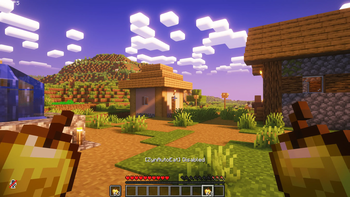

ZynAutoEat — Hands-Free Auto Eating for Fabric and Forge
The ZynAutoEat mod automatically maintains your hunger level without interfering with gameplay. It independently consumes food, starting from the off-hand, then moving to the main hand and quick access bar, smoothly continuing to eat until fully satiated. The function automatically pauses when right-clicking or opening any interface and resumes operation after completing actions. This is a lightweight client-side mod for quality of life improvement that works on servers without its installation.
Support: Fabric and Forge Both versions are available on this page. If the Forge build hasn't appeared for your version yet — it's in development.
Main Features
- Off-hand priority with backup option from quick access bar
- Smooth sequential eating until full saturation (preserves standard animation)
- Respects your actions — pauses when RMB is pressed and interfaces are opened, resumes after
- Fishing rod safety — prevents accidental casts/hooks between food consumption
- In-game blacklist with search, toggle all items, and reset
- Toggle message in action bar:
[ZynAutoEat] Enabled/Disabled - Client-side only — compatible with servers
How It Works
- Activates only in survival mode
- Selects food in order: Off-hand → Main hand → Quick access bar
- Skips items from the blacklist in settings
- Sequentially consumes food until hunger is fully satiated, then stops
- Instantly pauses when RMB is pressed or screen is opened (chat/inventory etc.), then automatically continues
Settings (In-Game)
Open ZynAutoEat Settings to configure item blacklist:
- Categories: Dangerous Food, Super Food, Normal Food
- Search bar, toggle all items, and reset to default settings
- Settings are saved locally
Controls (Default)
- H — Enable/disable ZynAutoEat
- J — Open ZynAutoEat settings
Compatibility
- Client-side only (quality of life improvement): works on any servers; server component not required
- Created for Fabric and Forge (project supports both versions)
Requirements
- Fabric: Fabric Loader + Fabric API
- Forge: Forge (Fabric API not required)
Installation
Fabric
- Install Fabric Loader and Fabric API for your Minecraft version
- Place ZynAutoEat
.jarfile in themods/folder - Launch the game, press H to enable, J to configure
Forge
- Install Forge Loader for your Minecraft version
- Place ZynAutoEat Forge
.jarfile in themods/folder - Launch the game, press H to enable, J to configure
Frequently Asked Questions
-
Will it eat "bad" food (e.g., rotten flesh)? No, if you added it to the blacklist. The settings screen contains reasonable default parameters that can be changed at any time.
-
Does it work with custom food from mods? Yes — if an item has a standard
FoodComponent, it can be used (if not in the blacklist). -
Will it conflict with right mouse button (RMB)? No. The mod instantly pauses when RMB is held and resumes operation after release.
Author
Author: Zynwro


