

Cute Mob Models RP - Cute creature models for Minecraft
[]
Development History
The creation of Cute Mob Models dates back to 2012 when a user named _jx first developed the concept of cute creature models. This project became the foundation for subsequent developments and inspired many creators. The following years brought new variations: first the original version was abandoned, then in 2014 Yarrmates released his remake, which became popular among many content creators.
Proof from Oniona0163: [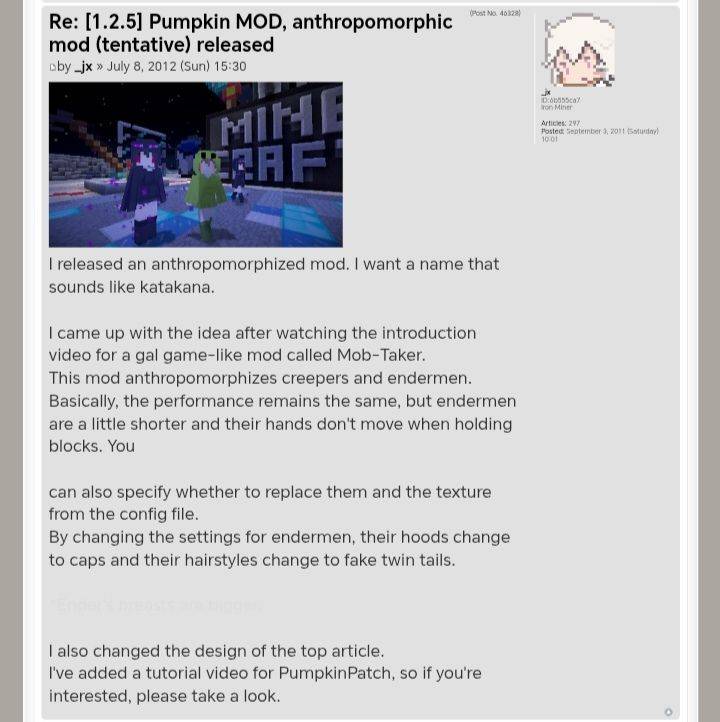]
[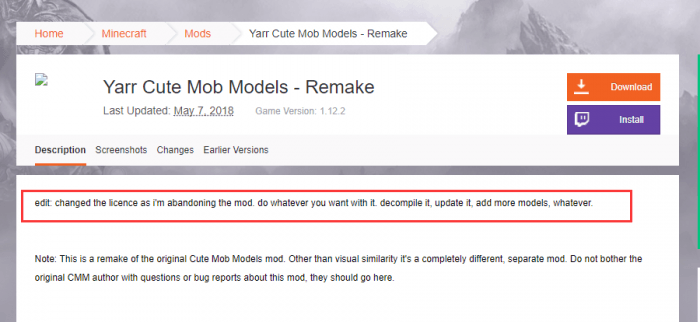]
Unfortunately, the version for Minecraft 1.12 was also abandoned by the developer in 2018. The project received new life in 2019-2020 when a team of enthusiasts united to revive and modernize the concept for current game versions, significantly expanding the number of models and improving their design.
[]
Installation Features
Two installation methods:
- OptiFine installation method
- Mod installation method for Fabric, Forge, Quilt (Fabric recommended)
[]
Key Features
Universal animations:
- Every creature gained eye blinking animation
- All creatures received a slight head bobbing animation
Special models:
- Slimes and Magma Cubes now have separate models for medium and small sizes
- Guardians bounce on their side when out of water
- Most baby creatures received their own unique models
Visual improvements:
- Different biome villagers differ in hair color and clothing
- Zombie villagers also vary by biome
- Enderman model became taller
The full list of added models includes: Axolotl, Bat, Bee, Cat, Chicken, Cod, Dolphin, Donkey, Drowned, Ender Dragon, Endermite, Evoker, Fox, Glow Squid, Goat, Horse, Llama, Mule, Ocelot, Panda, Phantom, Pig, Piglin, Piglin Brute, Pillager, Rabbit, Ravager, Sheep, Shulker, Skeleton Horse, Squid, Strider, Trader's Llama, Vex, Vindicator, Wandering Trader, Wither, Zombified Piglin, and Zombie Horse.
Latest updates:
Versions 1.19 and 1.20:
- Added Allay
- Added Warden (in development, bugs possible)
Versions 1.18-1.20:
- Fixed desert villager texture
- Fixed head items
Versions 1.15-1.17:
- Fixed baby creature sizes
System Requirements
For proper resource pack operation, obligatory OptiFine installation with activated settings:
- Video Settings → Quality → Custom Entity Models → ON
- Video Settings → Quality → Random Entities → ON
- Video Settings → Animations → Animated Textures → ON
If display issues occur, check these settings and report any problems with attached screenshots if necessary.







