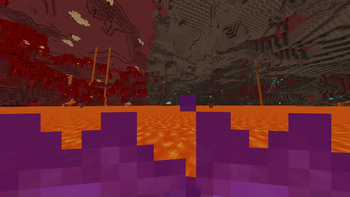

Purple fire
This resource pack radically changes the fire color in Minecraft, transforming it into a rich purple hue. Now flames will burn with an elegant purple color, bringing a unique atmosphere to the game.
How to install
- Move the resource pack archive to the resourcepacks folder of your Minecraft installation
- Launch the game, open the ESC menu and go to the "Resource Packs" section
- Activate the pack named "Purple Fire Color"
Compatibility notice
The resource pack is fully functional despite possible system warnings about incompatibility. Simply confirm usage by selecting "Yes" when prompted.
Purple fire will add mystery and magic to your gaming world, perfectly suited for magical biomes and fantasy projects!

