![[RESOURCE PACK] Magic Items](https://cdn.metamods.net/images/resourcepacks/rp-magicitems/screenshots/0b2dd0af9bb85a620da409b9e0669340feafec5d.png)
![[RESOURCE PACK] Magic Items](https://cdn.metamods.net/images/resourcepacks/rp-magicitems/logo.png)
Magical Artifacts for Minecraft
Getting to Know the Texture Pack
This texture pack is specifically designed to complement the Magic Items in Minecraft.
Installing the Texture Pack
To add these wonderful textures to your game, follow these simple steps:
- Download the texture pack file
- Open Minecraft
- Go to Settings
- Select the Texture Packs section
- Open the texture pack folder and place the downloaded file inside
Enchanted Items
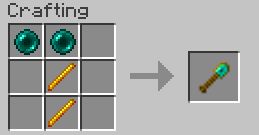 Ender Wand: Instantly teleports you 10 blocks in the direction you're looking. Activate with right click.
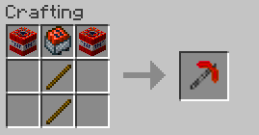 Explosive Pickaxe: Automatically places TNT when mining a block. Explosion stops if you remove the pickaxe from your hand.
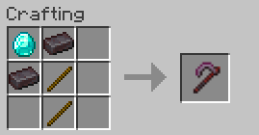 Scythe: Summons up to 5 zombies within a 5-block radius of the target. Activated with right click.
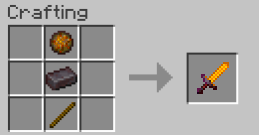 Fire Sword: Creates a ring of fire with a 10-block radius around the target. Activated with right click.
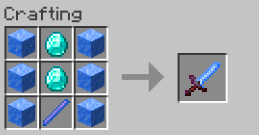 Ice Sword: Transforms water into ice in a small radius. Activated with right click.
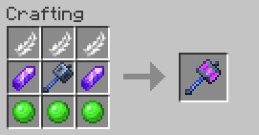 Gravity Hammer: Creates a gravity zone for 10 seconds. While inside the zone, you can jump higher. Activated with right click.
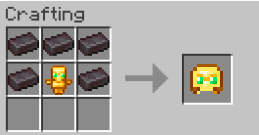 Helmet Of Undying: Makes you invulnerable for 5 seconds when your totem activates.
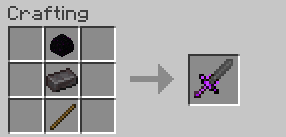 Dragon Sword: Summons an End Crystal up to 10 blocks away. Cooldown - 10 seconds.
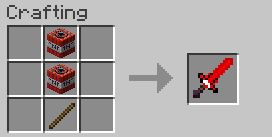 TNT Sword: Creates 4 TNT units 10 blocks above your head. Cooldown - 10 seconds.
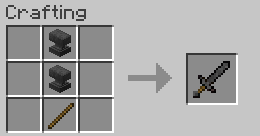 Anvil Sword: Drops an anvil 3 blocks above the enemy within a 10-block radius. Cooldown - 3 seconds.
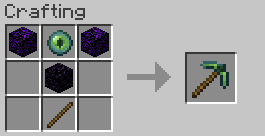 Ender Pickaxe: Creates an ender chest that can be mined. Cooldown - 5 seconds.