
Tunes : Backport
This resource pack fulfills its main purpose — transferring all new musical compositions from modern Minecraft versions to older game releases!
Previously known as "1.21 Music Backport"
🎵 What's New
- Now includes the "Chase the Skies" soundtrack from version 1.21.6!
⚠️ Important Information
- If the resource pack shows a warning "Incompatible, made for another version" — it will still work correctly
- The latest version preceding the one that added new music is supported (e.g., works in 1.21.6 but not in 1.21.7 where "Lava Chicken" disc was added)
- Due to the large number of .ogg files, the resource pack size will be substantial
🎶 Included Tracks
Tracks from Update 1.21 "Tricky Trials"
- Featherfall — Aaron Cherof
- Watcher — Aaron Cherof
- Puzzlebox — Aaron Cherof
- komorebi — Kumi Tanioka
- pokopoko — Kumi Tanioka
- yakusoku — Kumi Tanioka
- Deeper — Lena Raine
- Eld Unknown — Lena Raine
- Endless — Lena Raine
- Creator — Lena Raine
- Creator (Music Box Version) — Lena Raine
- Precipice — Aaron Cherof
Tracks from Update 1.21.6 "Chase the Skies"
- Lilypad — Amos Roddy
- Below and Above — Amos Roddy
- O's Piano — Amos Roddy
- Broken Clocks — Amos Roddy
- Fireflies — Amos Roddy
- Tears — Amos Roddy
Track from Version 1.21.7
- Hyper Potions — Lava Chicken
🎮 Playback Features
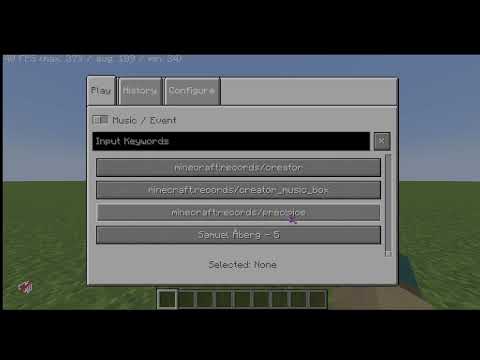
Most compositions play automatically during gameplay as they belong to the "minecraft:music.game" category. Tracks "Creator", "Creator (Music Box Version)", "Precipice", "Tears" and "Lava Chicken" require installation of the Music Control mod or usage of the /playsound command for playback.
🔧 Recommended Mods
- Music Notification — displays the name of playing music when it starts
- Music Control — provides full control over in-game music, including tracks from this resource pack
Although in versions 1.21.6+ Mojang added their own music notification system and track playback frequency adjustment, it's recommended to install the mentioned mods for complete music control!
📥 Installation
- Download the resource pack
- Move it to the "resourcepacks" folder in the .minecraft root directory
- Activate the resource pack in game settings
- Enjoy the new music!
🎛️ Setup Tips
Open the control settings menu and find the "Open Music Screen" option (from the Music Control mod). Assign a convenient key that doesn't conflict with other bindings. After setup, this window will allow you to manage all in-game music according to your preferences.
All musical compositions and assets belong to Mojang Studios and respective authors.

