
Colorful Logger Lib
Add Colors to Your Minecraft Mod Development Logs
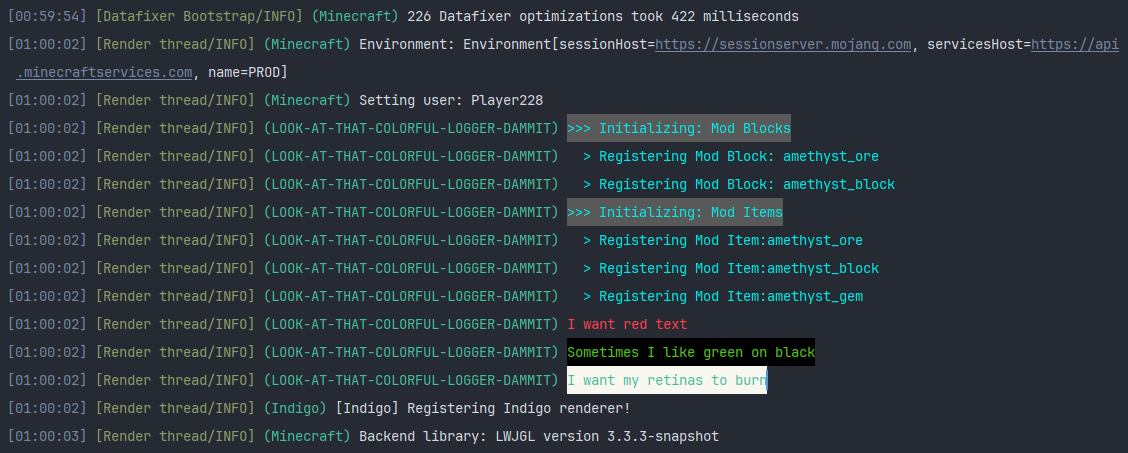
Want to make the debugging and development process of Minecraft mods more visual and convenient? This library allows you to easily add color formatting to your log messages using standard ANSI codes.
Frequently Asked Questions
Question: Is this a full mod?
No, this is a library for developers. It is used when creating mods and may be required as a dependency when installing the mod on a client or server, depending on how the developer uses the library.
Question: Can I use this library in my project?
Of course! You can freely integrate it into your developments.
Question: Is a specific Fabric version required?
The library works independently of the version, as long as your modding platform supports org.slf4j.Logger.
Current Functionality
Currently, only the Logger.info() method has color processing implemented. Future updates plan to add support for other methods such as Logger.error() and others.
Installation
Add the necessary Maven repositories to the repositories section of your build.gradle:
repositories {
    // Main repository
    exclusiveContent {
        forRepository {
            maven {
                name = "Handsome Steve's Maven"
                url = "https://maven.handsomesteve.net/releases"
            }
        }
        filter {
            includeGroup "net.handsomesteve"
        }
    }

    // Modrinth fallback repository
    exclusiveContent {
        forRepository {
            maven {
                name = "Modrinth"
                url = "https://api.modrinth.com/maven"
            }
        }
        filter {
            includeGroup "maven.modrinth"
        }
    }
}
Add the dependency to the dependencies section of your build.gradle:
dependencies {
    // Colorful Logger library
    implementation include("net.handsomesteve:colorfulloggerlib:${project.hs_colorful_logger}")

    // Fallback option (uncomment if main repository is unavailable)
    //implementation include ("maven.modrinth:colorfulloggerlib:${project.hs_colorful_logger}")
    // SOURCE CODE REQUIRES MANUAL DOWNLOAD WHEN USING FALLBACK REPOSITORY
}
Add the version variable to your gradle.properties, replacing {version} with the desired library version:
hs_colorful_logger={version}Usage
Create a public static final instance of the ColorfulLogger class. This instance will allow you to use the internal reference to org.slf4j.Logger from the ColorfulLogger class throughout your project.
import net.handsomesteve.api.ColorfulLogger;
import net.handsomesteve.api.ansi.AnsiColorBackground;
import net.handsomesteve.api.ansi.AnsiColorText;

public class FabricMod implements ModInitializer {
    public static final String MOD_ID = "your-mod-id";
    public static final ColorfulLogger LOGGER = ColorfulLogger.getInstance("your-mod-id", false);

   @Override
   public void onInitialize() {
       LOGGER.info(">> This is a plain message without any coloring");
       LOGGER.info(">> I want some green text", AnsiColorText.ANSI_BRIGHT_GREEN);
       LOGGER.info(">> I want some red text with a black background", AnsiColorText.ANSI_BRIGHT_RED, AnsiColorBackground.ANSI_BLACK_BACK);
   }
}
If necessary, you can work with Logger directly:
LOGGER.getLogger(); // Returns Logger for direct interactionHowever, with this approach, ANSI color coding will not be applied to your output.
NOTE: The
ColorfulLoggervariable can be declared anywhere in the project. It is recommended to declare it only once, as it is a singleton.To import the declared variable as a static import when referencing the variable:
import static com.packagename.FabricMod.LOGGER;
ALTERNATIVELY:
ColorfulLoggercan be instantiated anywhere in the project after declaring the singleton:public class References { private static final ColorfulLogger LOGGER = ColorfulLogger.getInstance(); public static ColorfulLogger getLogger() { return LOGGER; } }Then access:
import static com.package.References.getLogger;

public class MyClass {
    References.getLogger();
}
Source Code
[Only when using Modrinth Maven as a dependency]
A source code file is available in the version downloads.
This is a well-documented source code file where all variables, methods, and constructors are clearly defined, as is the class itself. You should download and add this file to the path:
.gradle/loom-cache/remapped_mods/net_fabricmc_yarn{version}/maven/colorfulloggerlib/{hs_colorful_logger_version}/Note: Replace the text in curly braces with current versions, etc.


