Custom LAN

Fabric mod that provides advanced management capabilities for Minecraft's local server.
Main Features
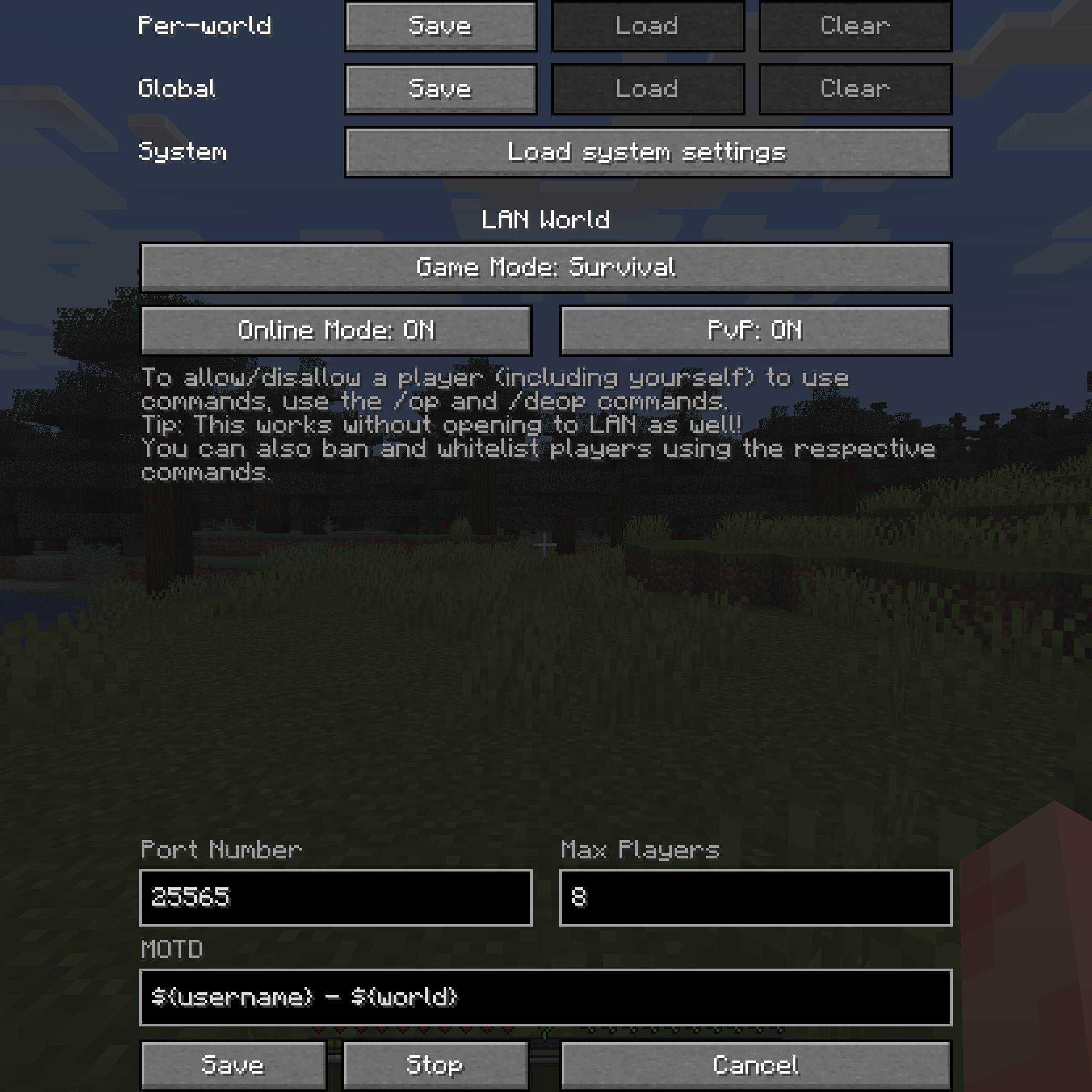
- Deep customization of the integrated server: online mode, PvP, maximum players, message of the day (MOTD)
- MOTD text formatting support using ampersands (
&) instead of paragraph symbols (§) and variables (e.g.,${username},${world}) - Server parameter changes during gameplay, including port, with the ability to stop the server without exiting the world
- Saving settings globally or per world separately (world settings have priority, then global, then system defaults)
- Individual administrator rights management through
/opand/deopcommands, ability to use cheats in singleplayer without opening LAN access - Ban system:
/ban,/ban-ip,/banlist,/pardon,/pardon-ip, as well as player whitelist via/whitelist(enable/disable via/whitelist on/off) - Server access from outside the local network without port forwarding through tunnels (currently only ngrok is supported)
Additional Functions
LAN world launch by pressing Enter, preservation of game mode for players (e.g., a player in creative mode will remain in it upon reconnection, even if the world is set to survival). The /publish command is extended and allows changing settings during gameplay (use port -1 for random selection):
/publish [<port>] [<onlineMode>] [<pvpEnabled>] [<maxPlayers>] [<defaultGameMode>] [<tunnel>] [<motd>]
/publish [perworld|global|system] [<port>] [<onlineMode>] [<pvpEnabled>] [<maxPlayers>] [<defaultGameMode>] [<tunnel>] [<motd>]
/publish stop
MOTD Formatting and Variables
In the message of the day, ampersands (&) are replaced with paragraph symbols (§) to apply formatting codes (e.g., &9Hello, &a&lworld! will make Hello, blue and world! green and bold). To display the ampersand itself, use two in a row (&&).
Available variables:
${username}— host's username (e.g., "DimiDimit")${world}— world name (e.g., "New World")
Settings Saving System
Settings are saved separately for each world or globally. When opening the "Open to LAN" screen, settings are loaded automatically in the specified order, and they can also be loaded manually via corresponding buttons.
The /publish command without specifying the type of saved settings uses the same priority order if the world hasn't been opened to LAN yet, or current values if it has. When specifying a particular type (perworld, global, system), only those settings or system defaults are used if they aren't saved.
Global settings are stored in .minecraft/config/customlan.toml, and per-world settings are stored in data/customlan.dat in the respective world folder.
Operator Management
Commands /op and /deop work the same as on dedicated servers. They can be applied to yourself, the host. This will add/remove the "Cheats" label from the world. Commands are available without opening LAN access, replacing the standard method of re-entering the world.
Operators are saved per world in the ops.json file. To allow operators to assign and remove other operators, as well as ban players and manage the whitelist, change their level in the ops.json file to 3 or higher (default is 2, level 4 allows using /publish). The host can always assign and remove operators, even without being an operator.
Bans and Whitelist
Commands work similarly to dedicated servers, but the host cannot be banned or added to the whitelist. Enabling the whitelist does not kick players not included in it.
Ban and whitelist files are saved per world: banned-players.json, banned-ips.json, whitelist.json. Whitelist status is stored in data/customlan.dat.
Requirements
Requires Fabric Loader and Cloth Config API, but Fabric API is not required.
The mod is ported to all Minecraft versions supported by Fabric (except snapshots). Porting to Forge is not planned, but pull requests are welcome.