
🪶 Feather Client
Feather Client is a minimalist and fully customizable client-side mod for Fabric, designed for Minecraft version 1.21.5. This project offers a redesigned mod management interface, adaptive game information display, and useful tools including free camera rotation, optical zoom, and enhanced visibility in darkness — all activated through an intuitive interface.
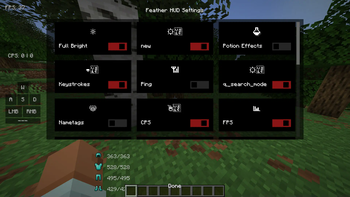
🎛️ Advanced Settings Menu
Customize the client to match your gaming style! Pressing the Right Shift key combination opens a modern options toggle panel:
- Enable/disable interface elements and functionality
- Easy access to Zoom, FullBright and Freelook options
- Ergonomic design with elements styled following standard Minecraft aesthetics
- Move HUD elements across the screen using drag-and-drop method with Right Alt
✨ Main Features
📊 Adaptive Game Displays Includes indicators for FPS, clicks per second, world coordinates, armor status, and active potion effects. Clean visuals with completely customizable element placement that doesn't affect server performance.
🔭 Smooth Zoom Function Use optical zoom following the OptiFine model, activated by assigned hotkeys. Perfect for precise actions and exploration gameplay.
🧭 Free Camera View Expand camera control capabilities with free rotation support, similar to Lunar Client functionality.
💡 Enhanced Lighting Mode Access night vision effect for comfortable navigation in dark locations. Hidden icon and no visual clutter ensure clean gameplay screen.
🧩 Interface Customization Two GUI operation modes: Right Shift provides access to function toggling, while Right Alt offers element position editor.
🧩 Compatibility
- Works with Minecraft 1.21.5
- Requires Fabric Loader for installation
- Purely client-side modification
- Compatibility with other HUD and utility mods
🧰 Installation
- Install Fabric Loader
- Move featherclient-x.x.x.jar file to the mods directory
- Launch the game and use Right Shift key combination to activate functionality


