
GD656Killicon
Main Features of the Modification
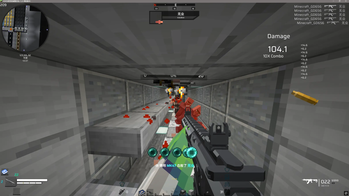
The GD656Killicon mod adds a visual kill notification system to Minecraft, inspired by first-person shooters. You get complete control over the display of icons that appear when eliminating opponents.
Visual Element Customization
You can fully personalize the appearance of kill icons: change their size, screen position, color scheme. Various animations are available - from basic to complex non-linear ones with adjustable speed. Special icons are supported for different situations: melee attacks, magical damage from potions.
Sound Accompaniment and Text
Configure sound effects for regular and critical hits, adjust their pitch. Create personalized text prompts with the ability to change content, color, and add text shadows. Each interface element can be enabled or disabled separately.
Scoring System and Commands
The mod includes an advanced scoring system that considers various factors: damage dealt, type of killed mob, critical hits, and assistance in eliminating opponents. Use commands to view your own rating or the top 10 players on the server. Administrators can manage player scores through special commands.
Technical Features
The configuration interface offers 95% customizable parameters with a transparent background. All settings can be changed directly in the game, with protection against accidental configuration reset. The server-side score storage system prevents data loss during reboots.
Configuration Settings
# Kill Icon Settings
[kill_icon]

# Icon display time (in game ticks)
# Range: 20 ~ 200
duration = 40

# Fade-out time (in game ticks)
# Range: 10 ~ 60
fadeTime = 20

# Icon size (in pixels)
# Range: 16 ~ 64
size = 32

# Text Color Settings
[text_colors]

# Weapon text color (hexadecimal format)
weaponColor = "008080"

# Target text color (hexadecimal format)
targetColor = "008080"
Content Personalization
To create custom icons, place the image at: resources\assets\gd656killicon\textures\gui\kill_icon.png
Custom sound effects are added through the file: resources\assets\gd656killicon\sounds\kill_sound.ogg
To apply changes, you'll need to unpack the mod's JAR file and create a resource pack.
Feature Demonstration
You can familiarize yourself with the mod's operation in the video review: 【【模组发布】它可以让你的MC手感爆炸!仿FPS游戏的击杀图标】 https://www.bilibili.com/video/BV1RTYsz8Eag/
Technical Requirements
The mod is compatible with Forge version 47.4.4 and above. It is not recommended to use with Optifine - for optimization, it's better to choose Embedium.


