
Item Name Recolorer
Mod Features
This mod opens up wide possibilities for personalizing item names in Minecraft. You will be able to:
- Change the color of any item names using dyes
- Apply custom RGB colors through hexadecimal codes
- Add various text effects: bold, italics, underline, strikethrough, and glitching text
Color Changing Process
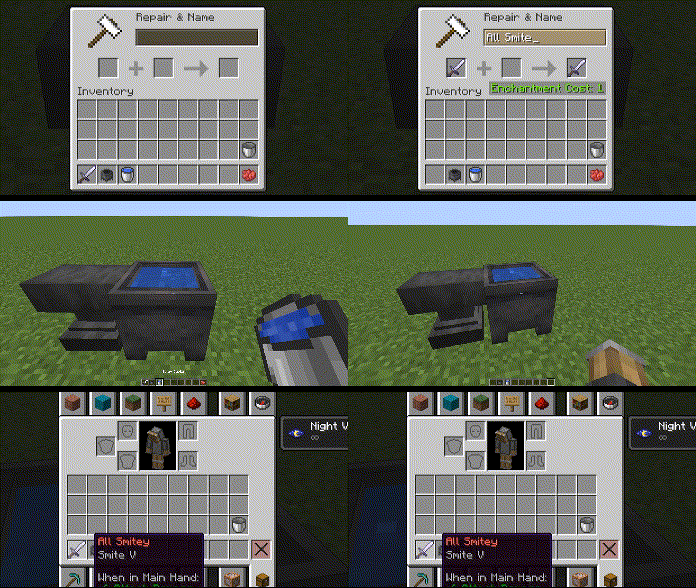
The mechanics are simple and intuitive. To begin, you will need a cauldron filled with water at any level.
Important condition: the item you want to modify must be previously renamed through an anvil. You can add a space at the end to preserve the current or default item name.
After renaming, throw the item into the cauldron with water. Now it's time to choose a color and/or text formatting.
For example, if you want a red item name, throw red dye into the same cauldron. Wait a few seconds, and the custom item name will turn red. Please note: when applying dye, all current formatting is reset (removes bold, italics, underline, etc.). Therefore, it is recommended to set the color first!
Blue dye gives blue color, white dye gives white, and so on.
How Text Formatting Works
The principle is similar to color changing: throw the item and the corresponding formatting element into a cauldron with water.
Here is a list of available formats and their corresponding items:
- Bold: Ink Sac
- Italics: Stick
- Underline: String
- Strikethrough: Feather
- Glitching Text: Glow Ink Sac
Let's repeat: setting the item color resets all formatting to default values. Color first, then formatting.
You can apply multiple formats simultaneously, including all available effects at once.
Here is a working example:
Custom RGB Colors (Hexadecimal Codes)
Let's say you want a completely red item name. The hexadecimal code for pure red is FF 00 00.
Take any paper item and rename it through an anvil as #FF0000.
The name must start with the # symbol and contain no spaces. Then throw the paper into the cauldron along with your item, as if it were dye, and you will get a custom color for the item name.


