

Location Copy
This mod significantly simplifies coordinate copying in Minecraft, making the process fast and convenient.

Main Features
To copy your current location and world name, simply press the "B" key (starting from LocationCopy v1.2.8). The key can be reassigned in the game's control settings.
Important note: In Minecraft version 1.21.6, the default key was changed from "G" to "B" due to conflict with the new "Quick Actions" feature. If you experience copying issues, check key settings in "Options → Controls → Key Binds".
Settings and Configuration
Mod settings are accessible via the "I" key in-game or through the ModMenu interface (if installed additionally). For precise configuration, you can edit the "config\LocationCopy.properties" file.
Advanced Mode (LocationCopy v1.2.0 and above)
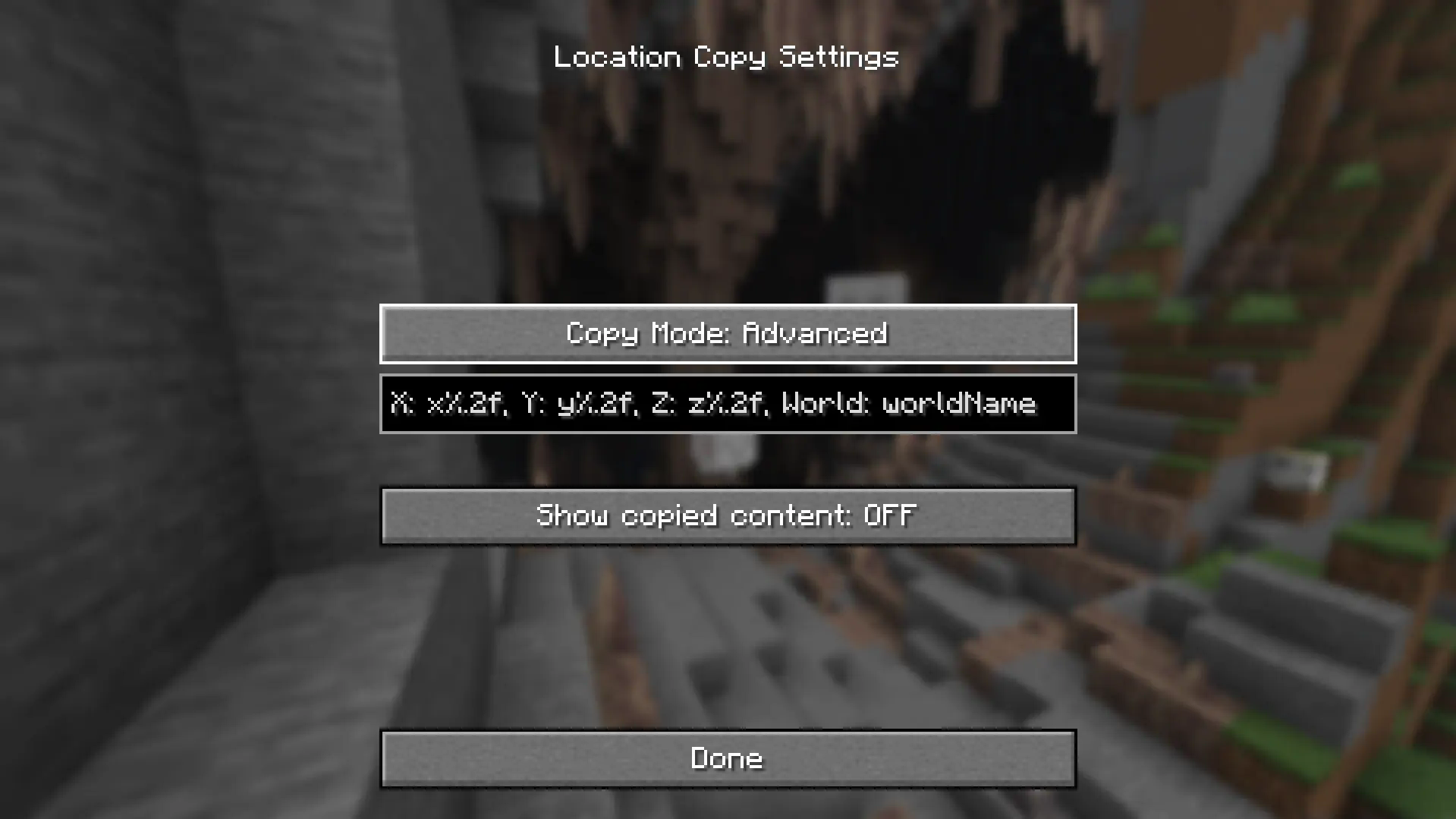
Advanced settings use the following parameters:
- X coordinate: x%.2f
- Y coordinate: y%.2f
- Z coordinate: z%.2f
- World name: worldName
The "%.nf" parameter determines the number of decimal places (default is 2). If set to 0, only whole numbers will be displayed. To exclude a specific coordinate from the output, simply remove the corresponding parameter from the settings.
Compatibility and Support
For proper operation, use a mod version compatible with your Minecraft version. If you find errors or translation issues, report them through the appropriate support channels.


