

mcsudo
The mcsudo mod brings familiar Linux operating system commands to Minecraft, allowing players to use terminal tools directly in the game.
Main Features
The mod adds several popular Linux commands, including sudo, echo, cat, and export. Some Linux mechanisms are also implemented, such as the home folder and the .bashrc configuration file.
Working with Commands
Parameters and Variables
Many commands support parameters specified using the _ symbol. Working with variables in the ${variable_name} format is also available. The export command is used to set variables.
Dynamic Variables
These variables are automatically updated with each execution:
home- current user's home folderuuid- user's unique identifierplayer- current player's nameexp- user's experience amountlevel- user's levelhealth- current healthmax_health- maximum healthworld- current world namelocation- current coordinates (x.y.z format)server- server namemotd- server's message of the daytime- current time (Unix timestamp)
Command List
echo
/echo <content> # Outputs textcat
/cat <file_path> # Shows file contentwrite
/write <file_path> <content> # Writes to file, overwriting previous contentexport
/export <variablename> <value> # Sets variable
/export public<variable_name> <value> # Sets public variable (requires sudo permissions)
apt
Allows installing mods directly from Modrinth.
/apt install <slug> <version> # Install module
/apt search <slug> # Search module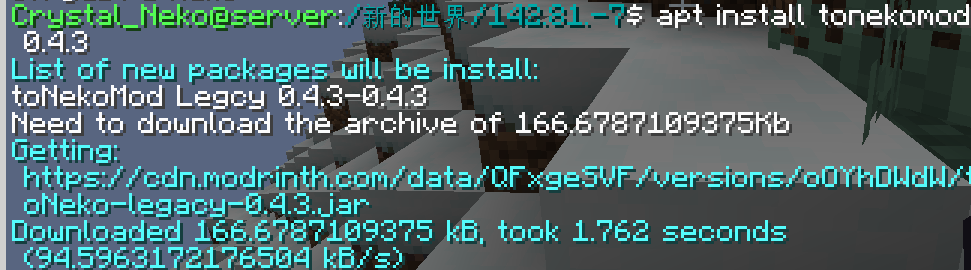
bash
Executes system bash commands (Linux only).
/bash <command>WARNING: THIS COMMAND IS DANGEROUS. MAY DAMAGE YOUR SYSTEM.
neofetch
Classic command for displaying system information.
Special Files
.bashrc
This file automatically executes commands when a player joins the server. Commands are separated by semicolons ; and don't require the / symbol at the beginning.
The file is located at home/<player_name>/.bashrc. Players can edit it without sudo permissions.


