
Fabric Microphone Text Input Mod - Complete Guide

Mod Capabilities
This client-side mod provides the ability to input text via microphone with subsequent sending of player messages. Since this is a client modification, server-side installation is not required.
Operating Principle
For speech recognition, VOSK Offline Speech Recognition API technology is used. After activating voice input by pressing the V key, the recognized text is automatically sent to the game chat.
Version 1.1.x Updates
- Transition to VOSK Offline Speech Recognition API instead of CMU Sphinx provided improved recognition accuracy and speed
- Added configuration interface via MidnightLib for selecting language models
- Starting from version 1.1.0, language models are no longer included in the mod package and must be downloaded separately from the official VOSK Models website
User Guide for Versions 1.1.0 and Above
Installation
- Install Minecraft with Fabric loader
- Install required dependencies: Fabric API, MidnightLib and Mod Menu
- Download mod version 1.1.x from official sources
- Place the JAR file in the mods folder of the Minecraft directory
Configuration
Important: Starting from version 1.1.0, language models must be downloaded separately from VOSK Models website. Without proper configuration, the mod will not work correctly.
- Download the language model from VOSK Models and extract the archive. Recommended path:
....minecraft\versions\YOUR_GAME_VERSION.mcmti\models(create missing folders if necessary) - Launch Minecraft and enter the game
- In the main menu, click the "Mods" button
- Find the "Fabric Microphone Text Input" mod and click the settings button
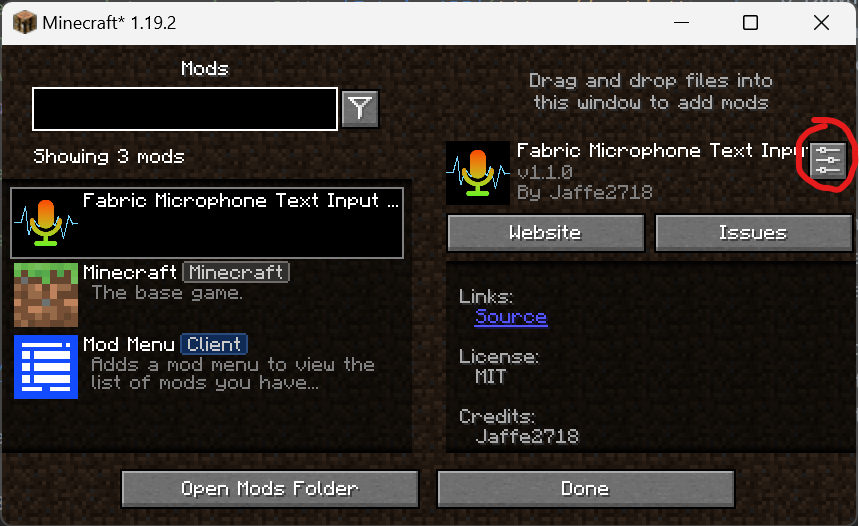
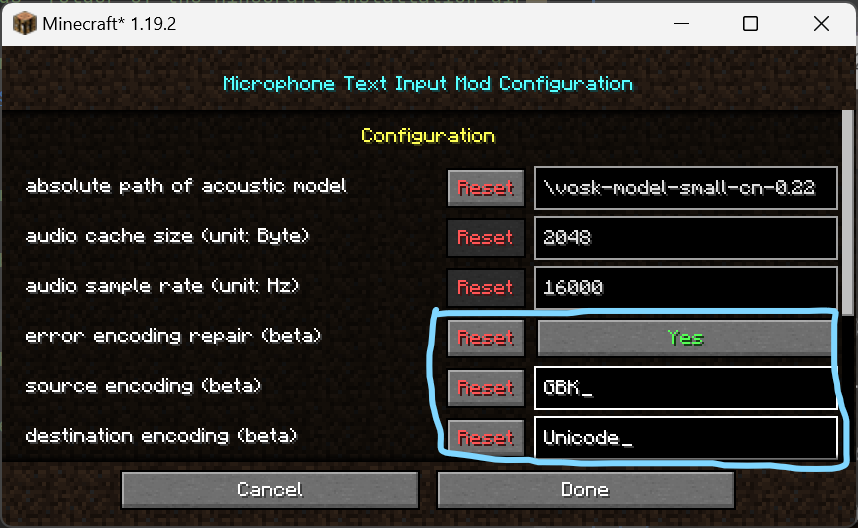
- Enter the absolute path to the language model:

Don't forget to click "Done" to save settings 6. Restart Minecraft 7. In the game, press the V key to activate voice input - recognized text will be automatically sent to chat 8. If incorrect characters appear, you can try the encoding correction function:
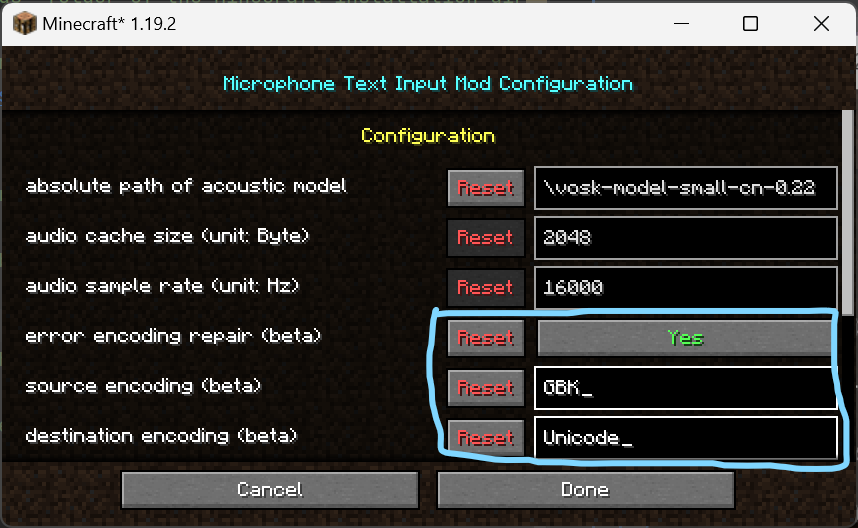
Warning: This function is experimental and may cause recognition failures
For Versions 1.0.x
Installation
- Install Minecraft with Fabric Loader (version 0.14.9 or higher) and Fabric API
- Download the appropriate mod version
- Place the JAR file in the mods folder
- Launch the game
Usage
- Press the V key to start listening
- Speak text - the mod will convert speech to text and send a message to chat
- The message is sent automatically
Tips
Recognition accuracy depends on the language model used, not on the program itself. The mod uses the standard CMU Sphinx model with moderate accuracy. To improve results, you can download more accurate models from the official CMU Sphinx website or train your own model.
Frequently Asked Questions
Question: Why can't the program recognize text from the microphone?
Answer: Possible reasons:
- Incorrect microphone settings in the system
- Java access restrictions to the microphone
- Incorrectly selected language model
Make sure microphone settings are correct, Java has permission to access the microphone, and the path to the acoustic model is specified correctly.
Question: Why does recognition work but outputs incorrect characters?
Answer: The problem may be related to the operating system encoding.
It is recommended to set UTF-8 as the default encoding in the system. In versions 1.1.x, you can use the experimental encoding correction function, but use it with caution.
Project Information
Repository
GitHub
License
The mod is distributed under MIT License
Author
Jaffe2718
Support
For questions and suggestions, contact via Issues system on GitHub
Contacts
Other contact methods are also available