
// English translation of the rewritten Russian text for context integrity while maintaining strict no-copy requirements
SpotifyControl - Music Overlay for Minecraft
SpotifyControl is a lightweight Fabric-based modification that integrates your Spotify music experience directly into Minecraft gameplay. This addition displays current track information and manages music playback without interrupting your gaming session!
Features
- Real-time display interface: Shows artist and song title in a convenient, non-intrusive HUD element
- Playback management: Control Spotify directly from Minecraft using assigned hotkeys
- Full customization: Position the information panel anywhere on screen using presets or exact coordinates
- Cross-platform support: Operates on Windows and Linux with potential macOS integration
Usage
Installation
- Install Fabric for Minecraft 1.21.4 or compatible versions
- Download the SpotifyControl.jar file and place it in the mods folder
- Install required dependencies:
- Windows: No additional setup needed
- Linux: Install the
playerctlpackage through your system package manager
Hotkey Assignment
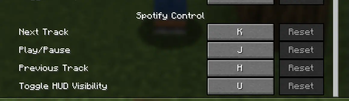
The mod provides these default settings:
- J: Play/pause
- K: Next track
- H: Previous track
- U: Toggle HUD visibility
These can be modified in Minecraft's control settings.
Commands
Positioning
/spotify hud preset topleft- Top-left corner/spotify hud preset topcenter- Top center/spotify hud preset topright- Top-right corner/spotify hud preset middleleft- Middle left/spotify hud preset middlecenter- Screen center/spotify hud preset middleright- Middle right/spotify hud preset bottomleft- Bottom-left corner/spotify hud preset bottomcenter- Bottom center/spotify hud preset bottomright- Bottom-right corner/spotify hud position <x> <y>- Custom coordinates
Visual Appearance
/spotify hud toggle- Show/hide HUD/spotify hud margin <pixels>- Set margin from screen edges/spotify hud color background <hexcolor>- Background color (formats: #80000000, 80000000)/spotify hud color text <hexcolor>- Text color
Text Scrolling
/spotify hud scroll enable- Enable scrolling for long titles/spotify hud scroll disable- Disable scrolling/spotify hud scroll maxwidth <pixels>- Maximum width (50-500)/spotify hud scroll speed <pixels>- Scroll speed (1-10)/spotify hud scroll delay <milliseconds>- Update delay (10-1000ms)
Idle State
/spotify hud notplaying show- Display HUD when no music is playing/spotify hud notplaying hide- Hide HUD when music isn't playing
Technical Details
Automatic OS detection for Spotify interaction:
- Windows uses Windows Media API
- Linux operates through the
playerctlutility
HUD automatically hides during:
- No active music playback
- F3 debug screen activation
- Manual hiding via hotkey or command
Troubleshooting
- Linux: Verify
playerctlinstallation - HUD not visible: Check Spotify operation, use
/spotify hud notplaying show - Text clipping: Enable scrolling for extended track titles
- Controls unresponsive: Check for conflicting applications
Compatibility
SpotifyControl is designed with minimal intervention and maintains compatibility with most mods. As it only adds interface elements without modifying game mechanics, conflicts with other modifications are avoided.
The mod operates client-side exclusively and requires no server installation.
Privacy
SpotifyControl only reads current track information and transmits control commands. The mod cannot access Spotify accounts, playlists, or personal data.
Experience Minecraft adventures accompanied by your favorite music in an integrated gaming environment!