Tweakeroo - Community Updated
Tweakeroo is a client-side modification that provides access to multiple "tweaks" — various micro-adjustments designed to streamline and enrich the gameplay experience. It operates via LiteLoader for Minecraft 1.12.x, through Rift on version 1.13.2, and is built on the Fabric framework from version 1.14 onwards.
IMPORTANT: Some of the offered features may be considered a violation of server rules in certain multiplayer environments, which could result in account bans.
Accurate Block Placement Features
The mod includes two separate functions that control block orientation: Accurate Block Placement and Flexible Block Placement. Generally, these only activate on a multiplayer server if there is a server-side mod installed that supports Carpet's precise placement protocol. This means they will not work on Realms, Spigot/Paper servers, or similar platforms. The flexible placement feature can function on vanilla, non-Carpet servers, but only for blocks whose orientation depends solely on which side is clicked—examples include hoppers, logs, and quartz pillars. However, even in this scenario, functionality is likely limited on Spigot servers, which rarely permit interactions with air blocks.
In short, block rotation mechanisms are active either in single-player mode or on servers that have the QuickCarpet mod installed, or a combination of Fabric Carpet and Carpet-Extra with the accurateBlockPlacement rule enabled. Soon, a separate project called Servux is expected to launch, adding server-side support for client-side mods, including the accurate placement protocol.
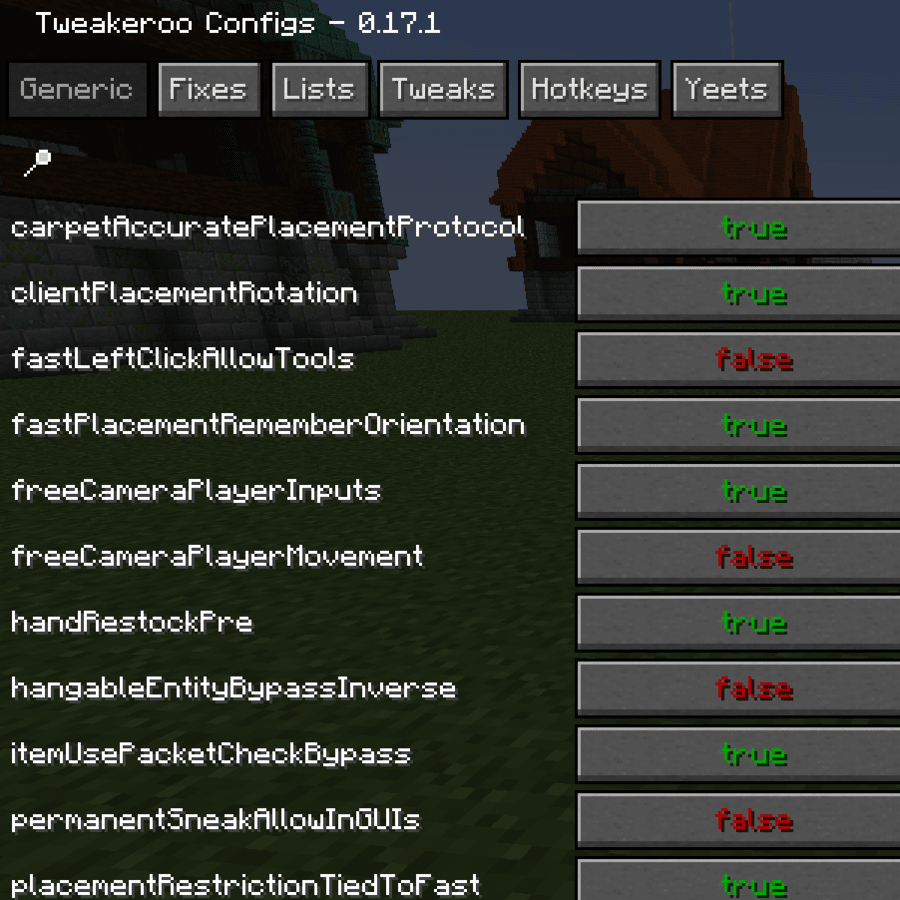
Regardless of the chosen block placement method, the function must be enabled in the Tweak Toggles category (or by assigning a hotkey in the Tweak Hotkeys section). In addition, ensure that the carpetAccuratePlacementProtocol parameter in Tweakeroo's settings is activated (currently located in the Tweak Toggles section, but will be moved to Generic soon). For single-player, the clientPlacementRotation parameter in the Generic category must be enabled as well (it is already active by default).
Next, set the activation keys in the Generic Hotkeys category, which should be held down to place blocks in a specific manner (look for the terms accurate and flexible in the parameter names).
The Accurate Block Placement function is commonly used for orienting pistons, observers, droppers, and dispensers. It uses two activation keys—accurateBlockPlacementInto and accurateBlockPlacementReverse. The "into" key causes the placed block to face into the clicked block side, while the "reverse" key reverses its direction relative to the standard alignment. The reverse key can be used alone or in combination with the into key. Essentially, this feature mirrors the functionality offered by the Carpet Client and Carpet mod combination in 1.12, operating through the accurate block placement protocol.
Flexible Block Placement displays a five-position overlay, like the ones you may have seen in videos. Holding the offset key allows blocks to be placed either diagonally or with a one-block gap from the clicked side. Simultaneously, the rotation key permits turning the block to "face" the direction indicated by the overlay interface—experimentation is encouraged to get a good feel for its capabilities.
Highlights of Available Customizations
- Accurate Block Placement — Enables placement of blocks in desired orientations on Carpet mod servers.
- After Clicker — Executes a specified number of automatic right-clicks on the last-placed block. Useful for instantly configuring repeaters, for instance, with a pre-selected delay.
- Angel Block — Allows placing blocks mid-air when in Creative mode.
- Reduced Explosion Particles — Applies less obtrusive visuals for large explosions.
- Fast Block Placement — Simplifies and speeds up block placement as the cursor moves over blocks. Adjustable modes reduce risks of accidental placements.
- Fast Left Click — When holding the attack button (left-click), performs automatic rapid clicks; click rate per game tick is adjustable in generic settings.
- Fast Right Click — Offers automatic rapid right-clicks during button hold; click frequency per tick also set in generic options.
- Fill/Clone Limit Change — Modifies the /fill and /clone command block limits in single-player.
- Flexible Block Placement — While holding an assigned hotkey, blocks can be placed at non-standard angles, useful for hoppers, logs, and others differing from default orientation.
- Gamma Override — Substitutes video gamma value with a custom Generic setting.
- Hand Restock — Automatically replaces empty stacks in the main or off-hand.
- Hold Attack — Simulates continuous press of the attack button (typically left mouse).
- Hold Use — Performs a continuous use action (usually right mouse).
- Hotbar Scroll — Permits scrolling the hotbar via an inventory row (similar to Hotbar Swap).
- Hotbar Slot Cycle — Cycles the selected hotbar slot post item use, with configurable slot limit. Ideal for rapidly placing repetitive block structures.
- Hotbar Swap — Allows swapping the hotbar with any of the three inventory rows, complete with preview on hotkey hold.
- Inventory Preview — When hovering over a block or entity that has an inventory while holding an assigned modifier key, displays the container contents. NOTE: Largely functional in single-player only, currently incompatible with Forge's IItemHandler inventories.
- Item Unstacking Protection — When enabled, prevents loss of items configured in Lists → unstackingItems (e.g., avoiding accidentally throwing buckets into lava).
- Lava Visibility — If player has Respiration helmet or Water Breathing potion effect, greatly diminishes lava fog.
- Map Preview — Brings up a miniature map view in inventory, accessible via Shift + hover over item.
- Movement Keys Last — Opposite movement keys do not cancel each other; the last-pressed key stays active instead.
- No Block Breaking Particles — Totally removes block-breaking particles.
- No Client Entity Updates — Removes all entity updates except player on the client side. Can help stabilize lag due to extraordinarily high entity counts.
- No Entity Rendering — Renders only player entities; all others are invisible to enhance FPS under heavy entity loads.
- No Falling Block Entity Rendering — Disables render of falling block entities, aiding FPS within contraptions teeming with them.
- No Item Switch Render Cooldown — Removes item switch animation delay in inventory and item usage timing.
- No Light Updates — Holds lighting updates client-side, performance-gainful during constant block changes (e.g., large slime-block mechanisms).
- No Light Updates All — More radical extension of the light updates feature; also prevents chunk heightmap and light recalculations client-side.
- No Portal Gui Closing — Allows interaction with inventory UI while inside Nether portals.
- No Slime Block Slowdown — Removes slime-block slipperiness effects client-side. Caution: Applies to other entities in single-player.
- Permanent Sneak — Publishes sneak mode without constant key hold.
- Pick Before Place — Auto-swaps targeted block (if present in inventory) to hands before placing/using another block.
- Placement Grid — Restricts placement to a customizable grid layout; key WARNING: Currently proper function requires Fast Placement tweak enabled.
- Placement Limit — Sets maximum block placement allowance per use/right-click run.
- Placement Restriction — Limits placement according to patterns (plane, line, face, column, diagonal). This forms the basis for Fast Block Placement internally, as an individual tweak option.
- Placement Restriction First — Restricts placement to the type of block initially clicked upon.
- Placement Restriction Hand — Restricts placement only when cursor targets the block type currently held.
- Player Inventory Peek — Displays a player inventory preview modal by holding designated activation key.
- Potion Warning — Fires an in-chat hotbar warning as potion effects near expiration.
- Print Death Coordinates — Puts death location coordinates to player's chat on death.
- Remove Own Potion Effects Particles — Removes potion effect visuals emanating from the player character.
- Render Invisible Entities — Shows invisible entities as translucent, reminiscent of Spectator view.
- Render Limit Entities — Imposes a rendering cap on entities like XP orbs and dropped items. Improves framerate with abundant entities.
- Repair Mode — Automatically moves Mending-endowed, near-broken items to hand so they can be repaired in proximity to an XP farm.
- Shulker Box Display — Shows Shulker boxes contents while holding Shift + hovering in inventory (applies to all bare vanilla container blocks).
- Shulker Boxes Stack When Empty — Let empty Shulker Boxes fall into a 64-item inventory stacking. CRITICAL: For multiplayer/collaboration, same-server mod-support needed, else stacked shulkers risk inventory/client mismatch issues.
- Swap Almost Broken Tools — Automatically switches all control-broken damageable items in-hand to newly-equippable ones when low-durability prior to the break-point event.
- Tab Complete Coordinates — On non-block targeted command-argument typing, tab completion writes player coordinates instead of "~" prefix.