Upgrades for Sheep
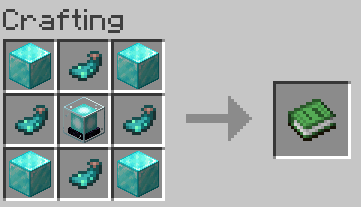
This datapack adds four new types of upgrades for sheep in Minecraft. To access these abilities, you need to craft special upgrade modules and throw them at the selected sheep.

How upgrades work
When using a module on a sheep, it is consumed, the sheep is dyed a certain color and receives a new name instead of the old one. You can enable and disable abilities by simply dyeing the sheep a different color. Important note: modules cannot be retrieved after application.
Types of upgrades
Redstone Coil Module
The sheep becomes red and starts dropping redstone dust underneath itself. This is a perfect automatic redstone generator! Feature: such sheep loses the ability to move on its own, which allows precise control over its position. Additional bonus: converts iron trapdoors into redstone repeaters (direction depends on trapdoor orientation). To return mobility to the sheep, simply dye it a different color.
Golden Module
The yellow sheep creates a golden field of influence around itself. If a player eats an apple or carrot near such a sheep, the effect will be the same as eating the golden version of food. Special effects:
- Golden apple gives the effect of an enchanted golden apple
- Enchanted golden apple enhances its properties and duration of effect
- Golden carrot temporarily increases speed and jump height
Terraforming Module
The lime sheep specializes in landscape transformation. It turns mycelium into regular grass blocks and also converts some other blocks into more useful options.
Force Field Module
The blue sheep creates a protective force field around itself that repels most hostile mobs. Exceptions: endermen, endermites, shulkers, guardians, wardens, slimes, and vexes. Important limitation: the field does not protect against arrows and other projectiles.
Additional commands
Use /trigger seeFieldParticles to turn particles from the golden module and force field module on/off. If you want to test all upgrades at once, use the command /function upgsheep:give_all_modules.
Demonstration video