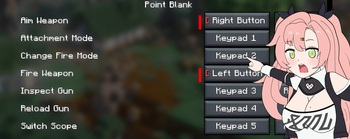

Control Configuration for Vic's Point Blank
Mod Overview
This mod provides the ability to configure weapon controls for Vic's Point Blank through Minecraft's keybinding system. Players can now assign their own buttons for shooting and aiming instead of standard mouse settings.
Who is this mod for?
Development began due to the absence of control configuration options in the base Vic's Point Blank mod. This is especially important for players with inverted mouse settings or special accessibility needs. Although such users are few, they deserve comfortable gameplay without constantly fighting muscle memory.
Main Features
The mod integrates with Minecraft's standard keybinding system and offers:
- Weapon Fire: Configurable key for shooting (default: left mouse button)
- Weapon Aim: Configurable key for aiming (default: right mouse button)
Technically, the mod intercepts mouse input handlers from Vic's Point Blank and redirects them to your custom key settings.
How to Configure Controls
- Open Options → Controls
- Find the Point Blank category
- Assign preferred keys for firing and aiming
Compatibility
- Minecraft: developed for version 1.21.1 (compatibility with other versions not verified)
- Mod Loader: NeoForge
- Required Mods: Vic's Point Blank
- Conflicts: unknown
Installation
- Download the mod JAR file
- Place it in the
mods/folder - Ensure Vic's Point Blank is also installed
- Launch the game and configure controls through Options → Controls
Important Note
This mod will be immediately removed if:
- Vic's Point Blank developers request its removal
- An official control inversion option is added to the base mod
The mod was created as a temporary solution for a small group of players who want to enjoy the game without constant button-pressing errors.


