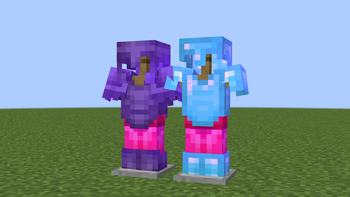

🔥 BlastProtLeggings Texture Pack
Overview
The BlastProtLeggings texture pack significantly enhances Minecraft gameplay by adding visual distinction to diamond and netherite leggings enchanted with blast protection. When these armor items receive this enchantment, their texture changes to a bright red color, providing instant visual recognition of their enchantment status.
PvP Advantages
In player versus player combat, quickly identifying your equipment's characteristics can be crucial for survival and strategy development. This texture pack offers the following benefits:
Instant Recognition - Thanks to the modified texture, you can determine at a glance which leggings have blast protection
Enhanced Awareness - Be prepared for explosive attacks by always knowing the current state of your defensive gear
Improved Strategy - Make informed decisions during combat based on knowledge of your equipment's characteristics
System Requirements
Optifine - Required to activate the Custom Item Textures (CIT) function
CIT Resewn - Provides dynamic texture changes based on the presence of enchantments
Installation Instructions
Optifine Installation
Visit the official Optifine website and download the version compatible with your Minecraft version. Run the downloaded file to install the modification.
Fabric Installation
Download the CIT Resewn mod from the appropriate resource. Place the obtained jar file in your Minecraft client's mods folder.
📁 Locating the Resource Packs Folder
Launch the Minecraft launcher and navigate to the main game menu. In the "Settings" section, select "Resource Packs", then click "Open Resource Pack Folder". Place the files of this texture pack in the opened folder.

