
BSL Minipacks
ABOUT THE PROJECT
BSL Minipacks is a resource collection for Minecraft: Java Edition containing various small improvements and adjustments. Initially these changes were separated into several individual packages, which explains the name "minipacks". However, for installation convenience all components are now combined into a single resource pack. The current version v2 is compatible with Minecraft 1.21 and newer, while version v1 supports game versions from 1.15 to 1.20.

INTERFACE
Simple and neat user interface designed to enhance the gaming immersion.
FOLIAGE TWEAKS
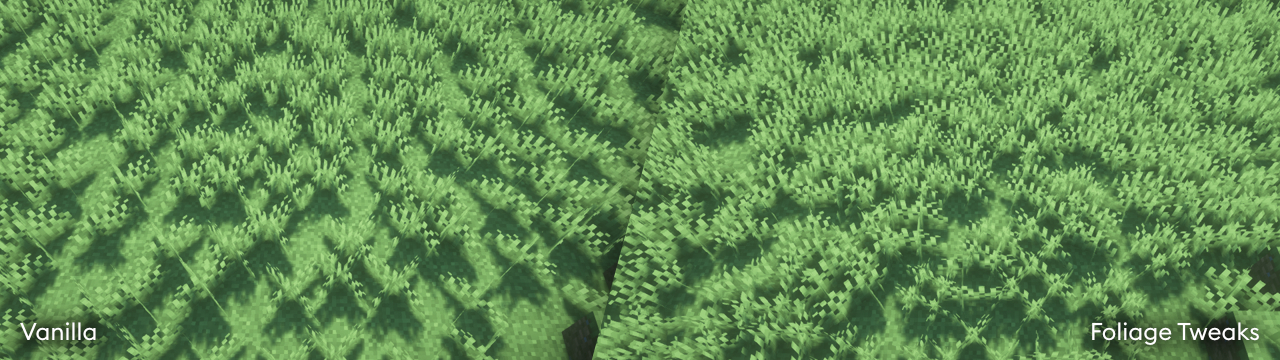
Increased density of grass and crops, improved cross model to prevent intersections with oscillating shader blocks, and added random object rotation. It's worth noting that these changes may impact game performance.

SKY COLOR
Included sky color map providing smooth shading transitions of the sky space when using BSL Shaders with the standard Minecraft sky color enabled.
INSTALLATION
- Download and install Optifine or Polytone (for sky color functionality)
- Download the resource pack
- Place the pack files in the .minecraft\resourcepacks folder
- Launch Minecraft
- Open Settings, "Resource Packs" section
- Select BSL Minipacks from the available packs list

