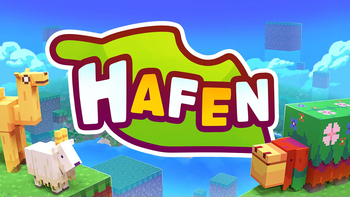
Hafen - Bright and Colorful Minecraft Resource Pack
After a long break, I've returned with Hafen updates!
This resource pack has been in development for some time with the goal of making Minecraft brighter and more colorful. Inspiration was drawn from various favorite video games - I hope you enjoy the result!
Bedrock Edition Version
The resource pack is available in the official store for 660 coins, but only updated to version 1.20.


Add-Ons
- UI Fix for 1.19.2 and Lower
- Classic Items - restores old item textures
- Classic UI - traditional interface
- Classic Colors - brings back previous color palette
- Pink Menus - alternative color scheme
Frequently Asked Questions
Question: Creative inventory is completely broken! Answer: Try installing the "UI Fix for 1.19.2 and Lower" add-on
Question: There is a large white shape at the bottom of the sky Answer: Go to Settings → Video → Details and disable the "Sky" option
Question: I don't like the font. Can it be changed? Answer: Yes. In the fonts folder (assets\minecraft\textures\font) there is a file called "optional ascii". To change the font, delete the "ascii" file and rename "optional ascii" to "ascii"
Question: I don't like the 2.0 update. Can I get the old textures? Answer: Special add-ons have been created for this purpose, which can be found above in this description
Question: How to use add-ons? Answer: These are mini resource packs that override Hafen files. In the texture packs menu, activate the add-on and place it above the main Hafen
Question: When activating, it says the pack is made for an older version. Is this normal? Answer: Yes, in most cases this warning can be ignored
Question: Too orange light! Can it be fixed? Answer: Yes. Install the "Orange Light Reduction" add-on or disable custom colors in video settings
Question: Which Minecraft versions does Hafen support? Answer: All versions after 1.12
Question: Compatible with Windows 10/Mobile/Consoles? Answer: Yes, available in the marketplace for Minecoins